Written by Aaditya Ruiker
Sunday, July 05, 2026
Converting Natural Language into Simulation-Ready HVAC Model using Buildings AI
By
Aaditya Ruikar
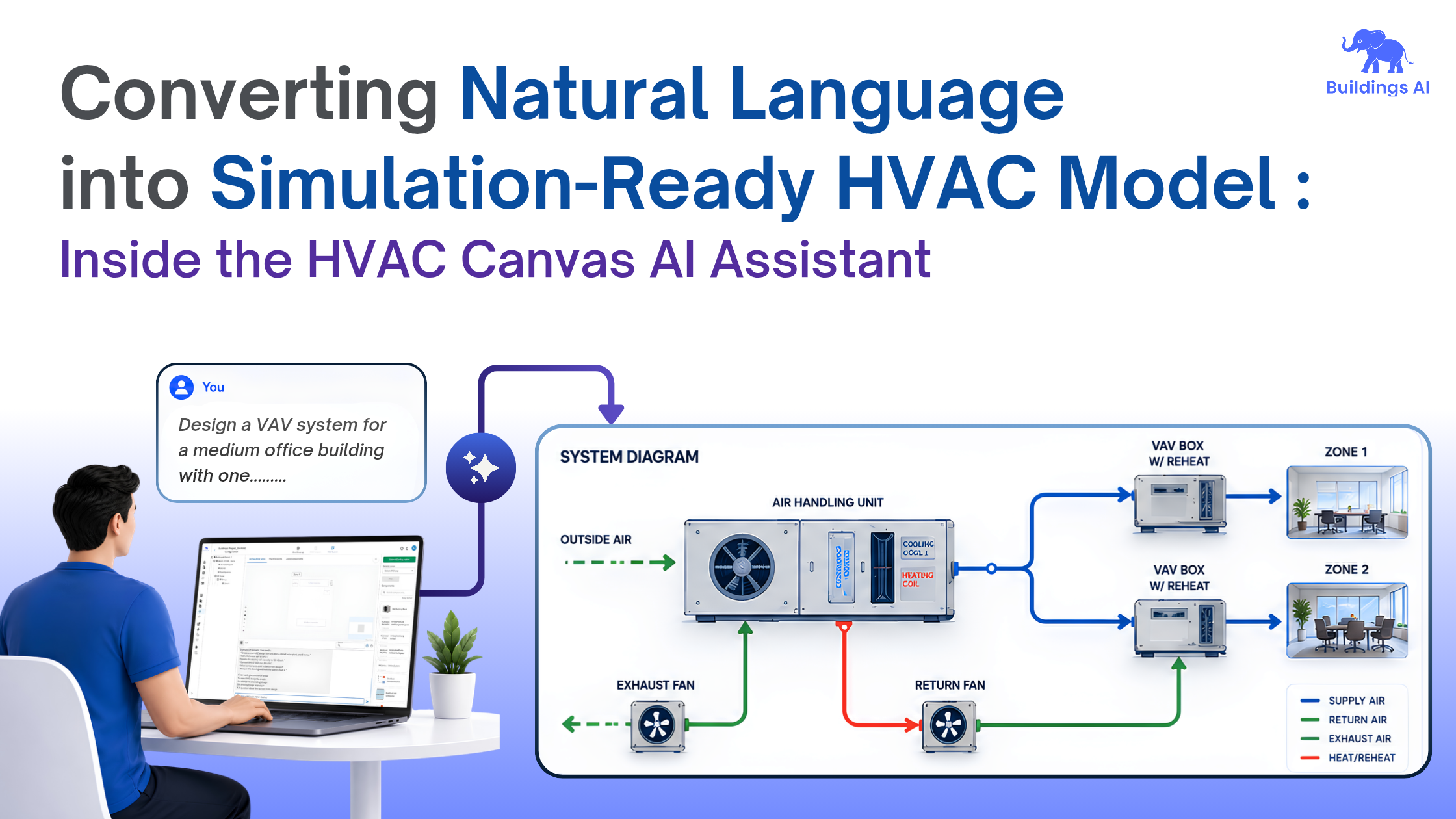

This is Part 2 of the HVAC Canvas blog series. In Part 1, we introduced HVAC Canvas as the visual workspace inside Buildings AI for designing and exploring HVAC systems with more flexibility than static templates allow. This article goes one level deeper: how the HVAC Canvas AI Assistant turns a plain-language system brief into a simulation-ready model, while keeping engineers in control at every checkpoint. Click the link below to read Part 1.
Before any energy or load calculation can run, an engineer needs a complete HVAC system model - every component selected, every parameter set, every connection wired, all of it matching an exact schema the simulation engine will accept. That single prerequisite is where most projects lose time. The HVAC Canvas AI Assistant, part of the Buildings AI platform from simulationHub, is built to collapse that prerequisite from hours of manual configuration into a conversation.
Read Part 01 Blog - Inside HVAC Canvas by Buildings AI
The bottleneck isn't the simulation - it's getting to a valid model
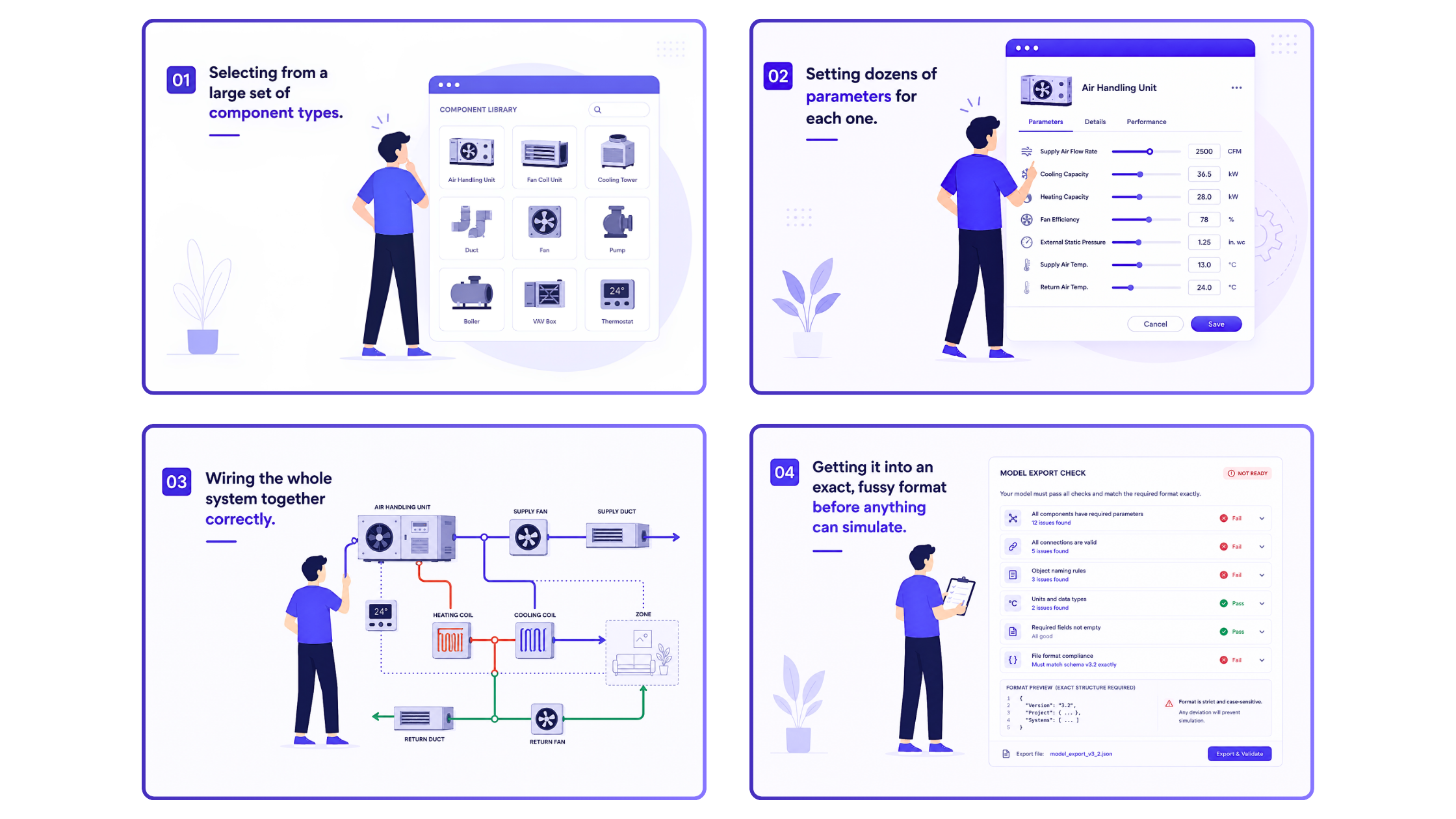
Across AEC and HVAC workflows, the same four leaks show up repeatedly: expertise locked in a few people, hours lost to setup and formatting, expensive expert time on slow turnaround, and full rework every time a design variant change. HVAC modeling concentrates all four tasks into one task. Building a model today means four manual steps, each with its own failure mode:
- Component selection - picking the right types (AHUs, fan coil units, cooling towers, ducts, fans, pumps, boilers, VAV boxes, thermostats) from a large library, before any sizing logic is even possible.
- Parameter entry - setting dozens of values per component (supply air flow rate, cooling/heating capacity, fan efficiency, external static pressure, supply/return air temperatures) in one field at a time.
- System wiring - connecting AHUs to heating/cooling coils, supply and return ducts, fans, and zones correctly, where a single wrong connection invalidates the whole loop.
- Export validation - passing the model through a strict, case-sensitive schema check (component completeness, valid connections, naming rules, units, required fields) before simulation can even start.
Get any one of these wrongs, and the model doesn't simulate. Get it right manually, and you've spent the kind of time that should be going into design iteration, not data entry.
The use case: describe it, get back a validated model
The workflow the Assistant enables is a plain-language brief in, a simulation-ready model out:
"Design a VAV system for a medium office building with one rooftop air handling unit. Include a cooling coil and heating coil. Supply air to two zones. Use variable air volume boxes with reheat. Include return and exhaust fan. Optimize energy efficiency."
From that single brief, the HVAC Canvas AI Assistant returns components selected, parameters filled, and connections wired — in the exact format the canvas consumes, with a system diagram and full component/parameter/connection lists generated in the same pass. The load calculation runs in the same session, no format translation step in between.
What makes this useful: it asks instead of guessing
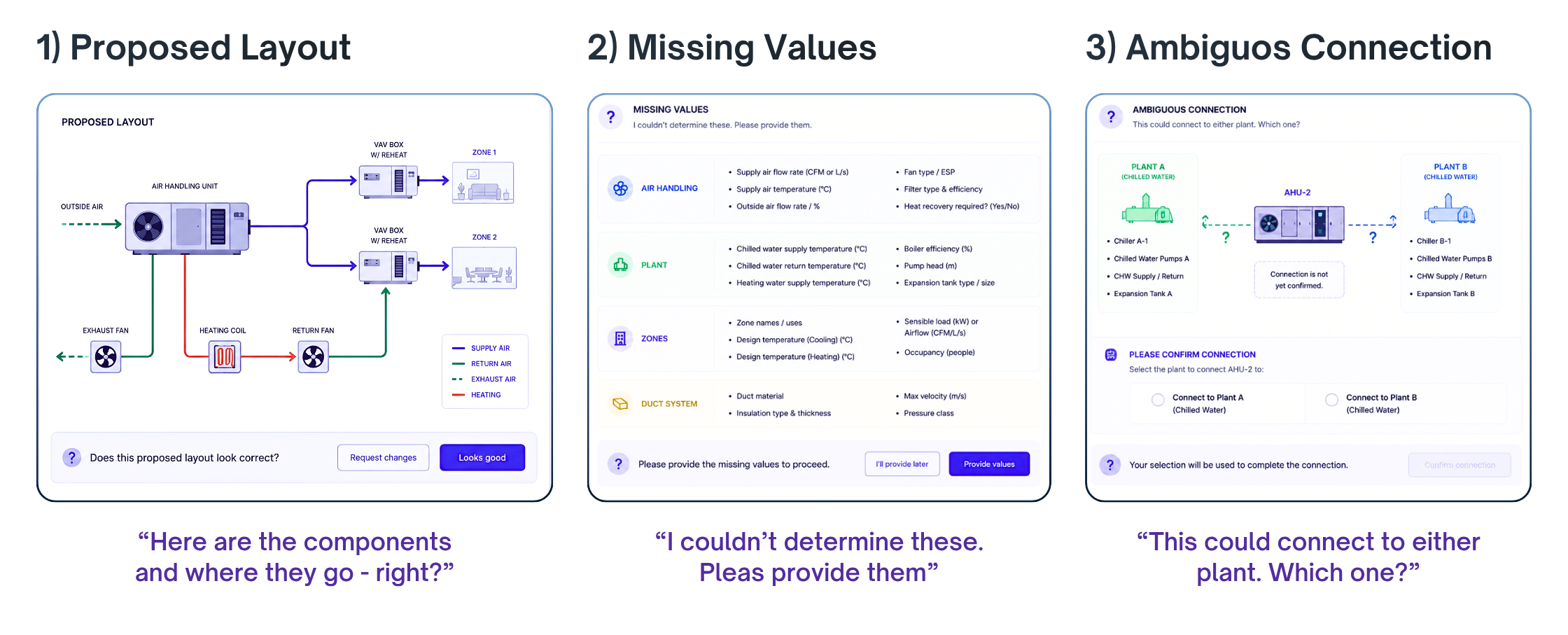
The most important design decision in this Assistant isn't the generation — it's the three points where it deliberately stops and hands control back:
- Proposed layout review — "Here are the components and where they go. Does this look correct? The Assistant groups components by function (air handling, plant, zones) and waits for confirmation before placing anything.
- Missing values prompted — "I couldn't determine these. Please provide them." Rather than defaulting ambiguous values like chilled water supply temperature or boiler efficiency, it surfaces exactly what's missing, organized by system area, and asks.
- Ambiguous connection resolution — "This could connect to either plant. Which one? When a component like an AHU could legitimately tie into Plant A or Plant B, the Assistant presents both options side-by-side and requires an explicit selection rather than inferring one.
This isn't a black-box generator that hands you a finished file. It's closer to a competent junior engineer who builds fast, but flags exactly the decisions that need a senior judgment call. That distinction — generation paired with structured human-in-the-loop checkpoints — is the actual USP, more than the speed itself.
The architecture: orchestrator, specialists, guardrails
Under the hood, this runs as a multi-agent system rather than a single generative pass:
- A ConductorAgent (orchestrator) reads the brief, plans the workflow, and routes only the work that's needed.
- Three specialist agents execute in parallel: a PlacementAgent (what equipment goes where), a ParameterAgent (fills every parameter), and a ConnectionAgent (wires every connection end to end).
- Each specialist output passes through a review gate — the same layout, missing-values, and ambiguous-connection checkpoints described above — before the result is marked in a validated, simulation-ready design in the exact canvas format.
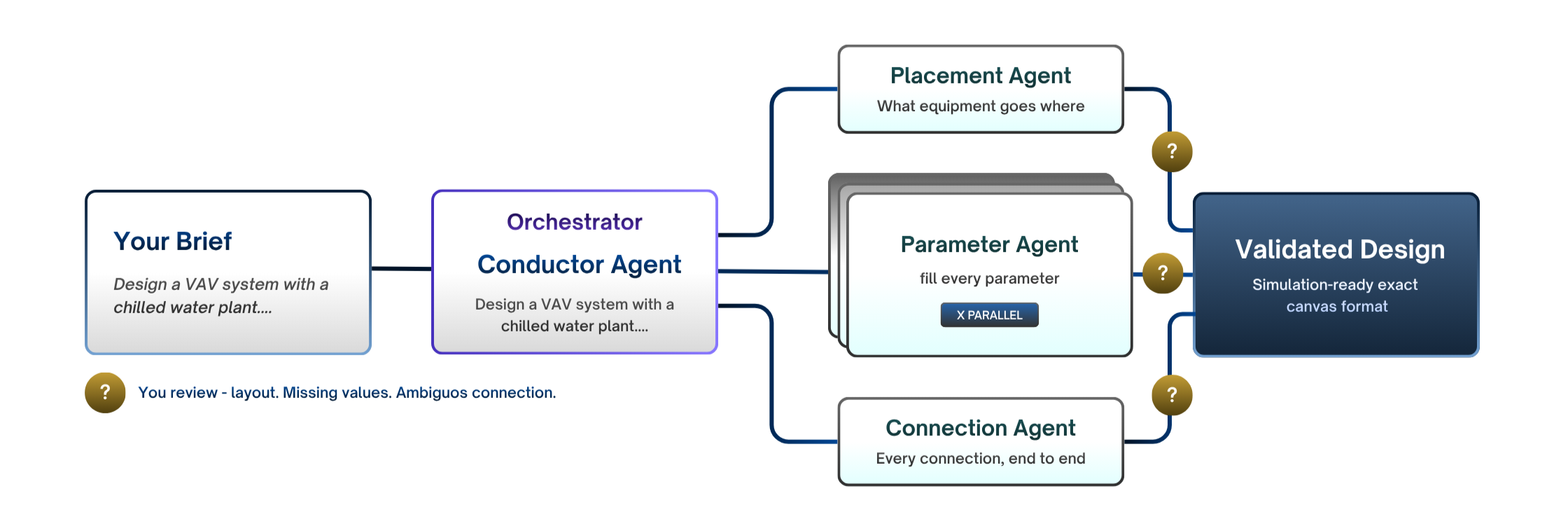
This is what makes the "always-valid output" claim credible rather than aspirational: validation isn't a final export check bolted onto the end; it's built into how each agent's work gets accepted.
Why these matters
The value of the HVAC Canvas AI Assistant is not that it adds another layer to the workflow. It removes one. Instead of spending hours choosing components, entering values, fixing broken connections, and checking export rules, the engineer starts with intent.
The Assistant turns that intent into a model the canvas can work with, while still pausing human decisions where engineering judgment matters. That is the practical shift: less manual setup, fewer invalid models, and faster movement from design idea to simulation.
You can also watch our on-demand webinar recording on the HVAC Canvas AI Assistant to see the workflow in action.
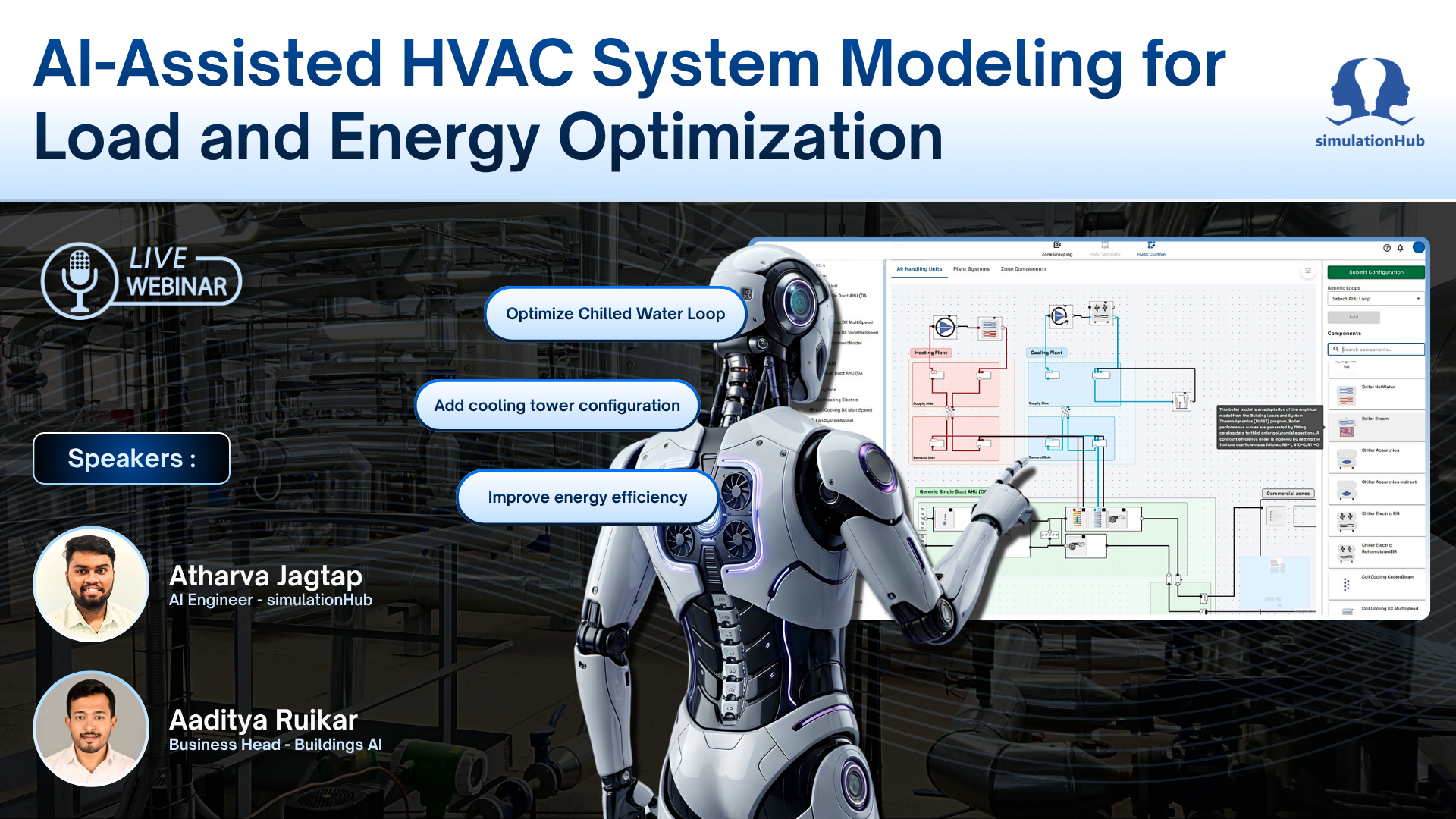
Want to know more or explore how Buildings AI can optimize your HVAC workflow? Visit Buildings AI and schedule a free demo — show us your workflow, and we’ll guide you through it.
Explore Buildings AI
Schedule a Demo call
Comments
Recent posts