<?xml version="1.0" encoding="utf-8"?><feed xmlns="http://www.w3.org/2005/Atom" ><generator uri="https://jekyllrb.com/" version="4.4.1">Jekyll</generator><link href="https://www.simulationhub.com/feed.xml" rel="self" type="application/atom+xml" /><link href="https://www.simulationhub.com/" rel="alternate" type="text/html" /><updated>2026-08-07T09:14:53+00:00</updated><id>https://www.simulationhub.com/feed.xml</id><title type="html">simulationHub | Cloud based CFD simulation apps for designer</title><subtitle>simulationHub is easy-to-use cloud based CFD apps for designers and works from mobile, tablets and desktop devices.</subtitle><entry><title type="html">Evaluating Axial Flow Nozzle Check Valve Performance with Autonomous Valve CFD</title><link href="https://www.simulationhub.com/blog/axial-flow-check-valve-evaluation" rel="alternate" type="text/html" title="Evaluating Axial Flow Nozzle Check Valve Performance with Autonomous Valve CFD" /><published>2026-08-05T03:30:00+00:00</published><updated>2026-08-05T03:30:00+00:00</updated><id>https://www.simulationhub.com/blog/axial-flow-check-valve-evaluation</id><content type="html" xml:base="https://www.simulationhub.com/blog/axial-flow-check-valve-evaluation"><![CDATA[<div class="shbg-pallet white ui segment stackable grid no-border no-padding no-margin no-radius no-shadow">
    <div class="row no-margin no-padding">
        <div class="sixteen wide mobile sixteen wide tablet sixteen wide computer column no-margin no-padding">
            <div class="container-fluid responsive-padding padding-large" style="padding-bottom: 0rem !important">
                <div class="content-block vertical-align-top">
                    <div
                        class="inner-content custom-section-width sixteen-wide position-center container-limit max-width-boxed-layout">
                        <div
                            class="shbg-pallet white ui segment stackable grid no-border no-padding no-margin no-radius no-shadow">
                            <div class="row no-margin no-padding">
                                <div
                                    class="sixteen wide mobile eight wide tablet eight wide computer column no-margin no-padding">
                                    <div class="container-fluid">
                                        <div class="content-block vertical-align-middle">
                                            <div class="inner-content custom-section-width sixteen-wide">
                                                <div class="sh-services-title">
    <div class="top-aligned image" style="width: 70px;">
        <img class="ui fluid circular image image-border size-mini color-teal" src="https://static.simulationhub.com/prod/images/common/team-members/maanas-sindkar.png" alt="Blog Author - Maanas Sindkar">
    </div>
    <div class="content">
        <div class="ui small header no-margin">
            Written by <span class="font-weight-bold text teal">Maanas Sindkar</span>
        </div>
        <div class="ui small header custom-link color-blue font-weight-bold no-margin">
            <a href="https://www.linkedin.com/in/maanas-sindkar/" target="_blank">
                @MaanasSindkar
            </a>
        </div>
    </div>
</div>
                                            </div>
                                        </div>
                                    </div>
                                </div>
                                <div
                                    class="sixteen wide mobile eight wide tablet eight wide computer column no-margin no-padding hide-on-mobile">
                                    <div class="container-fluid">
                                        <div class="content-block vertical-align-middle">
                                            <div class="inner-content position-right text-align-right">
                                                <div class="ui small header no-margin">
                                                    Approximately
                                                </div>
                                                <div class="ui small teal header font-weight-bold no-margin">
                                                    5 Minutes Reading
                                                </div>
                                            </div>
                                        </div>
                                    </div>
                                </div>
                                <div
                                    class="sixteen wide mobile eight wide tablet eight wide computer column no-margin no-padding hide-on-tablet hide-on-computer">
                                    <div class="container-fluid">
                                        <div class="content-block vertical-align-middle">
                                            <div class="inner-content">
                                                <div class="ui small header no-margin">
                                                    Approximately
                                                </div>
                                                <div class="ui small teal header font-weight-bold no-margin">
                                                    5 Minutes Reading
                                                </div>
                                            </div>
                                        </div>
                                    </div>
                                </div>
                            </div>
                        </div>
                    </div>
                </div>
            </div>
        </div>
    </div>
</div>
<div class="shbg-pallet white ui segment stackable grid no-border no-padding no-margin no-radius no-shadow">
    <div class="row no-margin no-padding">
        <div class="sixteen wide mobile sixteen wide tablet sixteen wide computer column no-margin no-padding">
            <div class="container-fluid responsive-padding padding-large">
                <div class="content-block vertical-align-middle">
                    <div class="header large ui">
                        <strong>Why Check Valve Selection Is More Than a Sizing Exercise</strong>
                    </div>
                    <div class="header small ui">Check valves are used in pipelines to prevent reverse flow and protect upstream and downstream equipment. However, valve selection involves more than simply choosing a non-return device. The type of check valve, its motion characteristics, cracking pressure, response time, pressure drop, and stability can all strongly influence overall pipeline behaviour. </div>
                    <div class="header small ui">Incorrect sizing or selection can lead to reverse-flow leakage, valve slam, water hammer, excessive pressure loss, and damage to connected components. In critical service applications, such risks are unacceptable, making high-fidelity performance evaluation an important part of check valve selection and design. </div>
                    <div class="header small ui">One advanced and increasingly popular solution for such applications is the axial flow nozzle check valve. </div>
                    <div class="sixteen wide mobile sixteen wide tablet eight wide computer column min-width-50" style="width: 100%;">
                        <img class="ui huge centered rounded image"
                        src="https://static.simulationhub.com/prod/images/pages/blogs/2026/5-August/check-valve-selection.png" />
                    </div>
                    <div class="header large ui">
                        <strong>Understanding Axial Flow Nozzle Check Valves</strong>
                    </div>
                    <div class="header small ui">Axial flow nozzle check valves — also known as non-slam, silent, or axial flow check valves — are spring-assisted non-return valves designed to prevent reverse flow while maintaining a streamlined flow path. Flow passes through the valve along its axis, and the internal geometry often resembles a converging-diverging nozzle. </div>
                    <div class="header small ui">The disc is guided in a straight line and held closed by a spring. When forward flow begins, the disc moves axially to open the valve; when flow reduces or reverses, the spring assists rapid closure. Because the disc stroke is short and aligned with the flow direction, these valves respond quickly to flow changes, helping reduce valve slam and water hammer. </div>
                    <div class="header small ui">Key advantages include low pressure drop, fast closure, stable operation across a wide flow range, compact construction, suitability for vertical piping, and improved long-term energy efficiency. However, performance depends strongly on correct sizing and spring selection. </div>
                    
                    <div class="sixteen wide mobile sixteen wide tablet eight wide computer column min-width-50" style="width: 100%;">
                        <img class="ui giant centered rounded image"
                        src="https://static.simulationhub.com/prod/images/pages/blogs/2026/5-August/check-valve-alternatives.png"/>
                    </div>
                    <div class="header large ui">
                        <strong>The Parameters That Actually Matter for AFCV Sizing</strong>
                    </div>
                    <div class="header small ui">Selecting the correct AFCV depends on several factors. Some are relatively easy to determine, while others require sophisticated testing or simulation methods. </div>
                    <div class="header small ui">Parameters such as Cv, Kv, and pressure drop can often be estimated with acceptable accuracy by interpolating existing manufacturer or catalogue data. Simple steady-state CFD can evaluate the same parameters with greater accuracy for a given valve opening or operating condition. </div>
                    <div class="header small ui">However, end users often need answers to more complex questions: What is the minimum flow rate required to keep the valve open? How much does the valve open at a given flow rate? Under a specific process condition, does the trim remain stable or show fluttering instability? Does the valve close fast enough to prevent reverse flow and slam? </div>
                    <div class="header small ui">Determining these advanced parameters typically requires physical flow-loop testing with specialized procedures and instrumentation. Another option is to run high-fidelity simulations that accurately capture valve dynamics and transient flow effects. Both approaches demand significant time, cost, and engineering expertise, often adding months to the performance evaluation cycle. </div>
                    <div class="header small ui">This is where Autonomous Valve CFD can help</div>
                    <div class="header large ui">
                        <strong>Where Autonomous Valve CFD Fits In</strong>
                    </div>
                    <div class="header small ui">Autonomous Valve CFD helps accelerate AFCV performance evaluation by generating key flow-performance data across multiple valve openings and operating conditions. Parameters such as Cv, Kv, pressure drop, velocity distribution, and pressure recovery can be evaluated using automated CFD workflows, reducing dependence on repeated manual setup and physical testing for every design iteration. </div>
                    <div class="sixteen wide mobile sixteen wide tablet eight wide computer column min-width-50" style="width: 100%;">
                        <img class="ui huge centered rounded image"
                        src=" https://static.simulationhub.com/prod/images/pages/blogs/2026/5-August/check-valve-under-avc.png"/>
                    </div>
                    <div class="header large ui">Case Study: Predicting Opening Percentage and Stability with Autonomous Valve CFD</div>
                    <div class="header small ui">For axial flow nozzle check valves, AVC can also support evaluation beyond standard steady-state performance. By combining CFD-derived hydrodynamic forces with the valve's spring characteristics, the valve opening percentage and cracking behaviour can be estimated for a given process condition. This helps engineers understand whether the valve is likely to remain closed, partially open, or reach a stable operating position at the specified flow rate. </div>
                    <div class="sixteen wide mobile sixteen wide tablet eight wide computer column min-width-50" style="width: 100%;">
                        <img class="ui huge centered rounded image"
                        src=" https://static.simulationhub.com/prod/images/pages/blogs/2026/5-August/check-valve-opeining-percentage.png"/>
                    </div>
                    <div class="header small ui">This plot shows the hydrodynamic force simulated in CFD. This force acts on the trim and drives it to open the valve, while the spring force, which increases with opening% (travel), drives the trim toward closing. </div>
                    <div class="sixteen wide mobile sixteen wide tablet eight wide computer column min-width-50" style="width: 100%;">
                        <img class="ui huge centered rounded image"
                        src=" https://static.simulationhub.com/prod/images/pages/blogs/2026/5-August/hydrodynamic-vs-spring-force.png"/>
                        <div style="color: #888; font-size: 0.7em; text-align: center; margin-top: 0.3em;">
                            Hydrodynamic force on trim at a given process condition, derived from CFD, and resisting spring force, kx vs. Opening percentage. Intersection of F_CFD and kx graph gives % opening at that process condition.
                         </div>
                    </div>
                    <div class="header small ui">When the hydrodynamic force is balanced by the spring force at a specific travel, the valve remains open to that travel under the given process conditions. This balance is represented in the plot as the intersection of the hydrodynamic force curve with the spring force curve. To obtain such information for a given valve under a given process condition, the following inputs are needed</div>
                    <div class="header small ui">
                        <ul>
                            <li>Valve specifications. </li>
                            <li>AFCV spring specifications (pre-load, stiffness). </li>
                            <li>Process conditions (flow rate, flow medium). </li>
                        </ul>
                    </div>
                    <div class="header small ui">Additionally, for applications where transient behaviour is critical, CFD results can also be coupled with a 1-D valve motion model to study stability. </div>
                    <div class="sixteen wide mobile sixteen wide tablet eight wide computer column min-width-50" style="width: 100%;">
                        <img class="ui huge centered rounded image"
                        src=" https://static.simulationhub.com/prod/images/pages/blogs/2026/5-August/afcv-1d-solver.png"/>
                        <div style="color: #888; font-size: 0.7em; text-align: center; margin-top: 0.3em;">
                            1D solver for AFCV. Shows stability regions at various flow rates.
                         </div>
                    </div>
                    <div class="header small ui">This plot shows the behaviour of an AFCV across a variety of process conditions. A one-dimensional equation solver is used to generate this curve based on outputs from CFD and specifications from the valve manufacturer. It shows an unstable region where the trim undergoes oscillations or flutter across a range of flow rates. The stable region begins in 2000 m3/hr and above, where the valve trim does not show transient instability. </div>
                    <div class="header small ui">With this approach, the simulationHub team can help manufacturers evaluate AFCV performance earlier in the design cycle, compare design variations faster, and reduce the time and cost associated with physical testing. </div>
                    <div class="header large ui"><strong>Conclusion</strong></div>
                    <div class="header small ui">Axial flow nozzle check valves are often selected for critical applications where fast response, low pressure drops, and non-slam operation are important. However, evaluating their real-world performance requires more than basic sizing calculations. Parameters such as opening percentage, cracking behaviour, transient response, and stability can strongly influence how the valve performs in an actual pipeline. </div>
                    <div class="sixteen wide mobile sixteen wide tablet eight wide computer column min-width-50" style="width: 100%;">
                        <img class="ui big centered rounded image"
                        src=" https://static.simulationhub.com/prod/images/pages/blogs/2026/7-July/avc-key-features.png"/>
                    </div>
                    <div class="header small ui">At SimulationHub, we help valve engineers bridge the gap between design intent and real-world performance. Autonomous Valve CFD (AVC) enables fast, high-accuracy evaluation of Cv, Kv, pressure drop, and flow behaviour, while also supporting advanced AFCV studies such as opening prediction, transient response, and 1-D/CFD-coupled dynamic analysis. Explore AVC or schedule a consultation with our experts to accelerate your valve development process. </div>
                    <a class="left-align-text ui right labeled icon large primary button uppercase" href="https://www.simulationhub.com/autonomous-valve-cfd" target="_blank">
                        <i class="right chevron icon"></i>Explore the Updated AVC Website
                    </a>
                    <a class="left-align-text ui right labeled icon large primary button uppercase" href="https://www.simulationhub.com/contact-us?tab=autonomous-valve-cfd" target="_blank" style="margin-top: 10px;">
                        <i class="right chevron icon"></i>Book a Free Demo
                    </a>
                </div>
            </div>
        </div>
    </div>
    <!-- BLOG AUTHOR -->
    <div class="shbg-grey-pallet hundred ui segment stackable grid no-border no-padding no-margin no-radius no-shadow">
        <div class="row no-margin no-padding">
            <div class="sixteen wide mobile sixteen wide tablet sixteen wide computer column no-margin no-padding">
                <div class="container-fluid responsive-padding padding-large">
                    <div class="content-block vertical-align-top">
                        <div
                            class="inner-content custom-section-width sixteen-wide position-center container-limit max-width-boxed-layout">
                            <div class=" hide-on-tablet hide-on-computer">
    <img class="ui small circular centered image image-border size-small color-teal" src="https://static.simulationhub.com/prod/images/common/team-members/maanas-sindkar.png" alt="Blog Author - Maanas Sindkar">
    <div class="ui medium teal centered header font-weight-bold">
        Maanas Sindkar
    </div>
    <div class="spaced" style="text-align: center">
        <a class="ui linkedin small icon button" target="_blank" href="https://www.linkedin.com/in/maanas-sindkar/">
            <i class="linkedin icon"></i>
        </a>
    </div>
    <div class="ui small header">
        Maanas Sindkar is a Simulation Engineer at simulationHub, specializing in Computational Fluid Dynamics (CFD) and engineering simulation for valve applications. With a Master's degree in Aerospace, Aeronautical and Astronautical Engineering from Virginia Tech, he contributes to the development of the Autonomous Valve CFD (AVC) platform. His expertise spans CFD, FEA, Python-based workflow automation, and high-performance computing (HPC). Maanas has worked on advanced valve-flow simulations, including 1D–3D coupled modeling for piston check valves, experimental validation studies, structural analysis, and efficient porous-media modeling, helping engineers accelerate product development through accurate, physics-based simulations.
    </div>
</div>
<div class="sh-services-title hide-on-mobile">
    <div class="top-aligned image" style="width:200px;">
        <img class="ui fluid circular image image-border size-small color-teal" src="https://static.simulationhub.com/prod/images/common/team-members/maanas-sindkar.png" alt="Blog Author - Maanas Sindkar">
    </div>
    <div class="content">
        <div class="ui medium teal header font-weight-bold">
            Maanas Sindkar
        </div>
        <div class="ui small header">
            Maanas is a Simulation Engineer at simulationHub, specializing in Computational Fluid Dynamics (CFD) and engineering simulation for valve applications. With a Master's degree in Aerospace, Aeronautical and Astronautical Engineering from Virginia Tech, he contributes to the development of the Autonomous Valve CFD (AVC) platform. His expertise spans CFD, FEA, Python-based workflow automation, and high-performance computing (HPC). Maanas has worked on advanced valve-flow simulations, including 1D–3D coupled modeling for piston check valves, experimental validation studies, structural analysis, and efficient porous-media modeling, helping engineers accelerate product development through accurate, physics-based simulations.
        </div>
        <div class="spaced">
            <a class="ui linkedin small icon button" target="_blank" href="https://www.linkedin.com/in/maanas-sindkar/">
                <i class="linkedin icon"></i>
            </a>
        </div>
    </div>
</div>
                        </div>
                    </div>
                </div>
            </div>
        </div>
    </div>
</div>]]></content><author><name>https://www.linkedin.com/in/maanas-sindkar/</name></author><category term="simulationHub" /><category term="Autonomous Valve CFD" /><category term="CFD" /><category term="Cavitation" /><category term="Valve Design" /><category term="simulationHub" /><category term="Autonomous Valve CFD" /><category term="CFD" /><category term="Design software" /><category term="Valve Engineers" /><summary type="html"><![CDATA[In critical pipelines, AFCV selection impacts safety and efficiency. This blog highlights key performance challenges, then shows how Autonomous Valve CFD predicts opening, pressure drop, and stability with less testing.]]></summary></entry><entry><title type="html">Simulating Ice Thermal Storage Systems Using BuildingsAI - Part 2: A Chicago Apartment Case Study</title><link href="https://www.simulationhub.com/blog/ice-thermal-storage-parttwo" rel="alternate" type="text/html" title="Simulating Ice Thermal Storage Systems Using BuildingsAI - Part 2: A Chicago Apartment Case Study" /><published>2026-08-02T22:51:54+00:00</published><updated>2026-08-02T22:51:54+00:00</updated><id>https://www.simulationhub.com/blog/ice-thermal-storage-parttwo</id><content type="html" xml:base="https://www.simulationhub.com/blog/ice-thermal-storage-parttwo"><![CDATA[<div class="shbg-pallet white ui segment stackable grid no-border no-padding no-margin no-radius no-shadow">
    <div class="row no-margin no-padding">
        <div class="sixteen wide mobile sixteen wide tablet sixteen wide computer column no-margin no-padding">
            <div class="container-fluid responsive-padding padding-large" style="padding-bottom: 0rem !important">
                <div class="content-block vertical-align-top">
                    <div
                        class="inner-content custom-section-width sixteen-wide position-center container-limit max-width-boxed-layout">
                        <div
                            class="shbg-pallet white ui segment stackable grid no-border no-padding no-margin no-radius no-shadow">
                            <div class="row no-margin no-padding">
                                <div
                                    class="sixteen wide mobile eight wide tablet eight wide computer column no-margin no-padding">
                                    <div class="container-fluid">
                                        <div class="content-block vertical-align-middle">
                                            <div class="inner-content custom-section-width sixteen-wide">
                                                <div class="inner-content custom-section-width sixteen-wide">
    <div class="sh-services-title">
        <div class="top-aligned image" style="width: 70px;">
            <img class="ui fluid circular image image-border size-mini color-teal" src="https://static.simulationhub.com/prod/images/common/team-members/Karan_Beeshm.jpg" alt="Blog Author - Karan Beeshm">
        </div>
        <div class="content">
            <div class="ui small header no-margin">
                Written by <span class="font-weight-bold text teal">Karan Beeshm</span>
            </div>
            <div class="ui small header custom-link color-blue font-weight-bold no-margin">
                <a href="https://www.linkedin.com/in/karan-beeshm-038961173" target="_blank">
                    @KaranBeeshm
                </a>
            </div>
        </div>
    </div>
</div>
                                            </div>
                                        </div>
                                    </div>
                                </div>
                                <div
                                    class="sixteen wide mobile eight wide tablet eight wide computer column no-margin no-padding hide-on-mobile">
                                    <div class="container-fluid">
                                        <div class="content-block vertical-align-middle">
                                            <div class="inner-content position-right text-align-right">
                                                <div class="ui small header no-margin">
                                                    Approximately
                                                </div>
                                                <div class="ui small teal header font-weight-bold no-margin">
                                                    5 Minutes Reading
                                                </div>
                                            </div>
                                        </div>
                                    </div>
                                </div>
                                <div
                                    class="sixteen wide mobile eight wide tablet eight wide computer column no-margin no-padding hide-on-tablet hide-on-computer">
                                    <div class="container-fluid">
                                        <div class="content-block vertical-align-middle">
                                            <div class="inner-content">
                                                <div class="ui small header no-margin">
                                                    Approximately
                                                </div>
                                                <div class="ui small teal header font-weight-bold no-margin">
                                                    5 Minutes Reading
                                                </div>
                                            </div>
                                        </div>
                                    </div>
                                </div>
                            </div>
                        </div>
                    </div>
                </div>
            </div>
        </div>
    </div>
</div>
<div class="shbg-pallet white ui segment stackable grid no-border no-padding no-margin no-radius no-shadow">
    <div class="row no-margin no-padding">
        <div class="sixteen wide mobile sixteen wide tablet sixteen wide computer column no-margin no-padding">
            <div class="container-fluid responsive-padding padding-large">
                <div class="content-block vertical-align-middle">
                    <div class="header large ui" style="color: rgb(9, 58, 103);">
                        <strong>New to This Series? Start with Blog 1</strong>
                    </div>
                    <div class="header small ui">Missed it? Check out the companion post first: "Inside the Model: How Ice Thermal Storage Systems Actually Work." It walks through the underlying mechanics — how the ice tank interacts with the chiller, what "charging" and "discharging" mean at the equipment level, and why the time-of-day supply temperature schedule is the key control lever — before this post puts those mechanics to the test in a real Chicago building.</div>    
                    <a class="left-align-text ui right labeled icon large primary button uppercase" href="https://www.simulationhub.com/blog/ice-thermal-storage-partone" target="_blank" style="margin-top: 10px;">
                        <i class="right chevron icon"></i>Part 01 : How Ice Thermal Storage Systems Actually Work
                    </a>
                    <div class="header large ui" style="color: rgb(9, 58, 103);">
                        <strong>Putting the Model to the Test</strong>
                    </div>
                    <div class="header small ui">Ice thermal storage systems let a building "pre-cool" itself overnight — freezing water into ice during cheap, off-peak hours, then melting that ice during the day to help meet cooling demand without running the chiller as hard. It's an appealing idea on paper. But does it actually move the needle on cost and comfort in a real building?</div>
                    <div class="header small ui">To find out, we simulated a full year of operation for a mid-rise residential apartment building in Chicago, using BuildingsAI's detailed ice storage and VAV reheat models. Here's what the numbers showed.</div>
                    <div class="header large ui" style="color: rgb(9, 58, 103);">
                        <strong>The Building and the Climate</strong>
                    </div>
                    <div class="header small ui">The case study models a mid-rise apartment prototype with seven conditioned thermal zones spread across the building footprint, each served by its own variable-air-volume (VAV) terminal drawing from a shared central air system. Occupancy, lighting, plug loads, and ventilation follow the ASHRAE 90.1 Mid-rise Apartment prototype assumptions — so the loads reflect realistic residential behavior, not a simplified test case.</div>
                    <div class="header small ui">The cooling plant pairs a water-cooled electric chiller in series with a detailed ice storage tank. During off-peak hours, the chiller charges the tank; during occupied hours, the discharging ice supplements the chilled-water loop. Heating comes from a natural-gas-fired hot-water boiler serving reheat coils at each VAV terminal.</div>
                    <div class="sixteen wide mobile sixteen wide tablet eight wide computer column min-width-50" style="width: 100%;">
                        <img class="ui huge centered rounded image"
                        src="https://static.simulationhub.com/prod/images/pages/blogs/2026/3-August/midrise_apartment_vav.png"
                        alt="Active and Passive Chilled Beams - Comparison" />
                    </div>
                    <div class="header small ui">We chose a demanding climate on purpose: <strong>Chicago O'Hare International Airport</strong> (41.98° N, -87.92° W), a cold, heating-dominated location with a short but intense cooling season. Design days used for equipment sizing were the 0.4% annual cooling design day (37.2°C max dry-bulb / 25.5°C wet-bulb) and the 99.6% annual heating design day (-20°C dry-bulb) — a wide seasonal swing that stress-tests both the ice storage charge/discharge cycle and the hot-water reheat system simultaneously.</div>
                    <div class="header small ui">The envelope itself is solidly built to prototype standards: an insulated metal roof (R-31.25), steel-framed exterior walls (R-15.63), and an insulated exterior mass floor (R-19.61), combined with exposed concrete floor and ceiling slabs that add real thermal mass throughout the building. Low-U, low-SHGC glazing (U-2.16, SHGC 0.35 on the main façade) keeps solar and conductive gains in check without sacrificing daylight.</div>
                    <div class="sixteen wide mobile sixteen wide tablet eight wide computer column min-width-50" style="width: 100%;">
                        <img class="ui huge centered rounded image"
                        src="https://static.simulationhub.com/prod/images/pages/blogs/2026/3-August/apartment-hvac-zone.png"
                        alt="Active and Passive Chilled Beams - Comparison" />
                    </div>
                    <div class="header large ui" style="color: rgb(9, 58, 103);">
                        <strong>How the System Was Configured</strong>
                    </div>
                    <div class="header small ui">The central plant ties together six major pieces of equipment: a constant-speed chilled-water pump, variable-speed condenser-water and hot-water pumps, a natural-gas boiler, a water-cooled electric chiller, the detailed ice storage tank, and a single-speed cooling tower.</div>
                    <div class="header small ui">A few control details matter here:
                        <ul>
                            <li>The <strong>chiller</strong> runs at a reference capacity of 22.5 kW and a reference COP of 3.2, with performance evaluated against water-cooled curves as a function of leaving chilled-water temperature and entering condenser fluid temperature.</li>
                            <li>The <strong>ice tank</strong> sits in series with the chiller on the chilled-water supply side. A time-of-day supply temperature schedule drives the behavior: roughly −5.0°C during charging hours, and 7.22°C otherwise — that's the signal that tells the plant when to freeze and when to just deliver normal chilled water.</li>
                            <li>The <strong>boiler</strong> is sized at 58.1 kW with a nominal thermal efficiency of 0.8, modulating hot-water flow to hold the leaving water temperature the VAV reheat coils need.</li>
                            <li>The <strong>cooling tower</strong> tracks outdoor wet-bulb temperature to reject condenser heat.</li>
                        </ul>
                    </div>
                    <div class="sixteen wide mobile sixteen wide tablet eight wide computer column min-width-50" style="width: 100%;">
                        <img class="ui huge centered rounded image"
                        src="https://static.simulationhub.com/prod/images/pages/blogs/2026/3-August/vav_reheat_terminal.png"
                        alt="Beam Cooling Output" />
                    </div>
                    <div class="header large ui" style="color: rgb(9, 58, 103);">
                        <strong>Comfort Held Up — Everywhere</strong>
                    </div>
                    <div class="header small ui">Before looking at cost, it's worth confirming the system actually did its job. Across all seven zones, for all 8,760 hours of the year:</div>
                    <div class="header small ui">
                        <ul>
                            <li><strong>100%</strong> of hours stayed in the “safe” heat-index band (below 26.7◦C) — zero caution, danger, or extreme-danger hours anywhere.</li>
                            <li><strong>95.3%</strong> of hours fell in the "little to no discomfort" humidex band, with the remaining hours landing in "some discomfort" — no zone ever reached "great discomfort."</li>
                            <li><strong>Cooling setpoint tracking was nearly perfect</strong>: unmet cooling degree-hours ranged from 0.00 to just 0.13 °C·hr per zone across the entire year.</li>
                            <li><strong>Heating setpoint tracking</strong> was also strong, with modest unmet degree-hours (2.16–5.64 °C·hr per zone, 24.76 °C·hr total) consistent with brief reheat-coil lag during the coldest design conditions.</li>
                        </ul>
                    </div>
                    <div class="header small ui">In other words: the ice-storage-assisted plant wasn't trading comfort for cost savings. It held setpoints tightly across a genuinely harsh climate swing.</div>
                    <div class="sixteen wide mobile sixteen wide tablet eight wide computer column min-width-50" style="width: 100%;">
                        <img class="ui huge centered rounded image"
                        src="https://static.simulationhub.com/prod/images/pages/blogs/2026/3-August/zone_temperatures.png"
                        alt="Heat Transfer Coefficient" />
                    </div>
                    <div class="header large ui" style="color: rgb(9, 58, 103);">
                        <strong>Where the Savings Actually Come From</strong>
                    </div>
                    <div class="header small ui">This is the part that matters most for anyone evaluating ROI. The simulation tracked electricity consumption separately for on-peak and off-peak hours. (3,380 on-peak hours/year, 5,380 off-peak hours/year):</div>
                    <div class="sixteen wide mobile sixteen wide tablet eight wide computer column min-width-50" style="width: 100%;">
                        <img class="ui big centered rounded image"
                        src="https://static.simulationhub.com/prod/images/pages/blogs/2026/3-August/apartment-roi-evaluation.png"
                        alt="Room Air Mass Flow" />
                    </div>
                    <div class="header small ui">Notice the chiller pulls a larger off-peak share (64.3%) than the facility average (59.0%). That gap is the ice storage system doing exactly what it's designed to do — shifting the chiller's heaviest work into the cheap, off-peak charging window.</div>
                    <div class="sixteen wide mobile sixteen wide tablet eight wide computer column min-width-50" style="width: 100%;">
                        <img class="ui huge centered rounded image"
                        src="https://static.simulationhub.com/prod/images/pages/blogs/2026/3-August/plant_temperature.png"
                        alt="Room Air Induction Flow" />
                    </div>
                    <div class="header small ui">Applying a Chicago (ComEd) time-of-use rate — $0.107/kWh on-peak, $0.040/kWh off-peak — that shift produces a real dollar impact:</div>
                    <div class="sixteen wide mobile sixteen wide tablet eight wide computer column min-width-50" style="width: 100%;">
                        <img class="ui big centered rounded image"
                        src="https://static.simulationhub.com/prod/images/pages/blogs/2026/3-August/apartment-annual-reduction.png"
                        alt="Room Air Induction Flow" />
                    </div>
                    <div class="header small ui">That's an estimated <strong>∼$1,135 annual reduction</strong> in chiller electricity cost — roughly 40% — driven almost entirely by moving load off-peak rather than reducing total energy use. The logic is straightforward: without storage, the chiller would have to run whenever the building needs cooling, which is disproportionately during expensive on-peak hours. With storage, most of that same cooling work gets done overnight instead.</div>
                    <div class="header small ui"><strong>One important caveat:</strong> this isn't a direct simulation-to-simulation comparison. The "without storage" figure is an engineering estimate based on shifting the chiller's existing annual consumption into an on-peak-heavy pattern, not a separate full-year simulation with the tank physically removed from the plant. A rigorous baseline would run that second simulation explicitly. Directionally, though, the result lines up with how utilities structure time-of-use pricing in the first place — and it's a meaningful enough estimate to justify running that baseline case if you're evaluating this for a real project.</div>
                    <div class="header large ui" style="color: rgb(9, 58, 103);">
                        <strong>The Takeaway</strong>
                    </div>
                    <div class="header small ui">In a cold-climate building where cooling season is short but intense, ice thermal storage still delivered a substantial estimated cost benefit — without compromising comfort or setpoint tracking. The mechanism is simple and verifiable in the data: shift the chiller's electrical load into off-peak hours, and let the utility rate structure do the rest.</div>
                    <div class="header small ui">If you're evaluating whether ice storage makes sense for a specific building, the two things worth checking early are (1) how wide the gap is between your on-peak and off-peak utility rates, and (2) whether your cooling load profile actually aligns with a practical overnight charging window. Both of those were favorable in this case study — and the results reflect it.</div>
                    <div class="header small ui">In a cold-climate building where cooling season is short but intense, ice thermal storage still delivered a substantial estimated cost benefit — without compromising comfort or setpoint tracking. The mechanism is simple and verifiable in the data: shift the chiller's electrical load into off-peak hours, and let the utility rate structure do the rest.</div>
                    <div class="header large ui" style="color: rgb(9, 58, 103);">
                        <strong>Take the Next Step: Start Your Free Trial or Book a Demo</strong>
                    </div>
                    <div class="sixteen wide mobile sixteen wide tablet eight wide computer column min-width-50" style="width: 100%;">
                        <img class="ui huge centered rounded image"
                        src="https://static.simulationhub.com/prod/images/pages/webinars/2025/17-December/FreeTrial.png"
                        alt="Pdf2Bim" />                     
                    </div>
                    <a class="left-align-text ui right labeled icon large primary button uppercase" href="https://www.simulationhub.com/buildings-ai" target="_blank">
                        <i class="right chevron icon"></i>Explore Buildings AI</a></strong>
                    </a>
                    <a class="left-align-text ui right labeled icon large primary button uppercase" href="https://www.simulationhub.com/contact-us?tab=buildings-ai" target="_blank" style="margin-top: 10px;">
                        <i class="right chevron icon"></i>Schedule a Demo call
                    </a>
                </div>
            </div>
        </div>
    </div>
    <!-- BLOG AUTHOR -->
    <div class="shbg-grey-pallet hundred ui segment stackable grid no-border no-padding no-margin no-radius no-shadow">
        <div class="row no-margin no-padding">
            <div class="sixteen wide mobile sixteen wide tablet sixteen wide computer column no-margin no-padding">
                <div class="container-fluid responsive-padding padding-large">
                    <div class="content-block vertical-align-top">
                        <div
                            class="inner-content custom-section-width sixteen-wide position-center container-limit max-width-boxed-layout">
                            <div class=" hide-on-tablet hide-on-computer">
    <img class="ui small circular centered image image-border size-small color-teal" src="https://static.simulationhub.com/prod/images/common/team-members/Karan_Beeshm.jpg" alt="Blog Author -Karan Beeshm">
    <div class="ui medium teal centered header font-weight-bold">
       Karan Beeshm
    </div>
    <div class="spaced" style="text-align: center">
        <a class="ui linkedin small icon button" target="_blank" href="https://www.linkedin.com/in/karan-beeshm-038961173">
            <i class="linkedin icon"></i>
        </a>
    </div>
    <div class="ui small header">
       Karan currently serves as a Member of the Technical Staff at the Centre for Computational Technologies Private Limited. Within the organization, he demonstrates a high level of enthusiasm for OpenFoam Development and system dynamics modeling. His professional interests lie primarily in computational and data science applied to advanced energy systems. Karan obtained his undergraduate degree in Mechanical Engineering from Ramaiah Institute of Technology.
    </div>
</div>
<div class="sh-services-title hide-on-mobile">
    <div class="top-aligned image" style="width:200px;">
        <img class="ui fluid circular image image-border size-small color-teal" src="https://static.simulationhub.com/prod/images/common/team-members/Karan_Beeshm.jpg" alt="Blog Author -Karan Beeshm">
    </div>
    <div class="content">
        <div class="ui medium teal header font-weight-bold">
           Karan Beeshm
        </div>
        <div class="ui small header">
            Karan currently serves as a Member of the Technical Staff at the Centre for Computational Technologies Private Limited. Within the organization, he demonstrates a high level of enthusiasm for OpenFoam Development and system dynamics modeling. His professional interests lie primarily in computational and data science applied to advanced energy systems. Karan obtained his undergraduate degree in Mechanical Engineering from Ramaiah Institute of Technology.
        
    </div>
    <div class="spaced">
           
        <a class="ui linkedin small icon button" target="_blank" href="https://www.linkedin.com/in/karan-beeshm-038961173">
            <i class="linkedin icon"></i>
        </a>
    </div>
</div>
                        </div>
                    </div>
                </div>
            </div>
        </div>
    </div>
</div>]]></content><author><name>https://www.linkedin.com/in/karan-beeshm-038961173</name></author><category term="Buildings AI" /><category term="simulationHub" /><category term="Agentic AI" /><category term="Building Performance Simulation" /><category term="simulationHub" /><category term="Energy Analysis" /><category term="Building Performance Simulation" /><category term="simulationHub" /><category term="Buildings AI" /><summary type="html"><![CDATA[Continuing the series, BuildingsAI simulates a Chicago apartment with ice storage, cutting chiller costs by ~40% while holding comfort setpoints. For owners and designers evaluating if ice storage pencils out.]]></summary></entry><entry><title type="html">Simulating Ice Thermal Storage Systems - Part 01: How Ice Thermal Storage Systems Actually Work</title><link href="https://www.simulationhub.com/blog/ice-thermal-storage-partone" rel="alternate" type="text/html" title="Simulating Ice Thermal Storage Systems - Part 01: How Ice Thermal Storage Systems Actually Work" /><published>2026-07-26T22:51:54+00:00</published><updated>2026-07-26T22:51:54+00:00</updated><id>https://www.simulationhub.com/blog/ice-thermal-storage-partone</id><content type="html" xml:base="https://www.simulationhub.com/blog/ice-thermal-storage-partone"><![CDATA[<div class="shbg-pallet white ui segment stackable grid no-border no-padding no-margin no-radius no-shadow">
    <div class="row no-margin no-padding">
        <div class="sixteen wide mobile sixteen wide tablet sixteen wide computer column no-margin no-padding">
            <div class="container-fluid responsive-padding padding-large" style="padding-bottom: 0rem !important">
                <div class="content-block vertical-align-top">
                    <div
                        class="inner-content custom-section-width sixteen-wide position-center container-limit max-width-boxed-layout">
                        <div
                            class="shbg-pallet white ui segment stackable grid no-border no-padding no-margin no-radius no-shadow">
                            <div class="row no-margin no-padding">
                                <div
                                    class="sixteen wide mobile eight wide tablet eight wide computer column no-margin no-padding">
                                    <div class="container-fluid">
                                        <div class="content-block vertical-align-middle">
                                            <div class="inner-content custom-section-width sixteen-wide">
                                                <div class="inner-content custom-section-width sixteen-wide">
    <div class="sh-services-title">
        <div class="top-aligned image" style="width: 70px;">
            <img class="ui fluid circular image image-border size-mini color-teal" src="https://static.simulationhub.com/prod/images/common/team-members/Karan_Beeshm.jpg" alt="Blog Author - Karan Beeshm">
        </div>
        <div class="content">
            <div class="ui small header no-margin">
                Written by <span class="font-weight-bold text teal">Karan Beeshm</span>
            </div>
            <div class="ui small header custom-link color-blue font-weight-bold no-margin">
                <a href="https://www.linkedin.com/in/karan-beeshm-038961173" target="_blank">
                    @KaranBeeshm
                </a>
            </div>
        </div>
    </div>
</div>
                                            </div>
                                        </div>
                                    </div>
                                </div>
                                <div
                                    class="sixteen wide mobile eight wide tablet eight wide computer column no-margin no-padding hide-on-mobile">
                                    <div class="container-fluid">
                                        <div class="content-block vertical-align-middle">
                                            <div class="inner-content position-right text-align-right">
                                                <div class="ui small header no-margin">
                                                    Approximately
                                                </div>
                                                <div class="ui small teal header font-weight-bold no-margin">
                                                    7 Minutes Reading
                                                </div>
                                            </div>
                                        </div>
                                    </div>
                                </div>
                                <div
                                    class="sixteen wide mobile eight wide tablet eight wide computer column no-margin no-padding hide-on-tablet hide-on-computer">
                                    <div class="container-fluid">
                                        <div class="content-block vertical-align-middle">
                                            <div class="inner-content">
                                                <div class="ui small header no-margin">
                                                    Approximately
                                                </div>
                                                <div class="ui small teal header font-weight-bold no-margin">
                                                    7 Minutes Reading
                                                </div>
                                            </div>
                                        </div>
                                    </div>
                                </div>
                            </div>
                        </div>
                    </div>
                </div>
            </div>
        </div>
    </div>
</div>
<div class="shbg-pallet white ui segment stackable grid no-border no-padding no-margin no-radius no-shadow">
    <div class="row no-margin no-padding">
        <div class="sixteen wide mobile sixteen wide tablet sixteen wide computer column no-margin no-padding">
            <div class="container-fluid responsive-padding padding-large">
                <div class="content-block vertical-align-middle">
                    <div class="header large ui" style="color: rgb(9, 58, 103);">
                        <strong>Cooling Doesn’t Have to Happen When You Need It</strong>
                    </div>
                    <div class="header small ui">Cooling a building doesn’t have to happen at the same moment a building needs it.That’s the entire premise behind ice thermal storage (ITS): instead of running a chiller flat-out every time occupants need cool air, you let the chiller do its work overnight — when electricity is cheap and outdoor conditions are mild — and bank that cooling as ice. During the day, you spend down the “cold” you already paid for.</div>
                    <div class="header small ui">It’s a simple idea with real operational upside: lower on-peak electricity draw, smaller peak chiller loads, and more flexibility in how a building’s cooling plant is sized and dispatched. But simple ideas can still be hard to model accurately. In this post, we walk through how advanced simulation platforms like BuildingsAI represent ice storage systems — from the physical components involved, to the actual equations EnergyPlus solves under the hood.</div>
                    <div class="header large ui" style="color: rgb(9, 58, 103);">
                        <strong>What’s Actually in an Ice Storage Plant</strong>
                    </div>
                    <div class="header small ui">A typical ice storage system isn’t a single piece of equipment — it’s an integrated plant with a few key components working together:
                    </div>
                    <div class="header small ui">
                        <ul>
                            <li>A water-cooled or air-cooled chiller</li>
                            <li>An ice storage tank containing the latent storage media</li>
                            <li>Primary and secondary chilled-water pumps</li>
                            <li>Distribution piping and control valves</li>
                            <li>Building cooling coils or terminal units</li>
                        </ul>
                    </div>
                    <div class="header small ui">The storage tank is the heart of the system. Think of it as a thermal battery: during charging, the chiller pulls heat out of the tank until ice forms around the internal heat exchanger surfaces. During discharging, warm water returning from the building flows through the tank, melts the ice, and comes out the other side as chilled water ready to serve the building.</div>
                    <div class="header small ui">The reason ice storage is so space-efficient compared to, say, a giant chilled-water tank, comes down to one physical property: <strong>latent heat of fusion</strong>. Instead of storing cooling by changing a fluid’s temperature (sensible storage), ice storage exploits the energy required to change water’s phase — from liquid to solid. That phase-change energy is enormous relative to a simple temperature swing, which is why ice tanks can store a lot of cooling capacity in a comparatively small footprint.</div>
                    <div class="sixteen wide mobile sixteen wide tablet eight wide computer column min-width-50" style="width: 100%;">
                        <img class="ui huge centered rounded image"
                        src="https://static.simulationhub.com/prod/images/pages/blogs/2026/24-July/ice_storage_branch.png"/>
                        <div style="color: #888; font-size: 0.7em; text-align: center; margin-top: 0.3em;">
                            Chilled water loop branch showing the detailed ice storage tank plumbed in series with the electric chiller in BuildingsAI
                         </div>
                    </div>
                    <div class="header large ui" style="color: rgb(9, 58, 103);"><strong>Two Modes, One Tank</strong></div>
                    <div class="header small ui">Ice storage systems operate in exactly two states.</div>
                    <div class="header medium ui">
                        <strong>Charging Mode</strong>
                    </div>
                    <div class="header small ui">Charging happens when the refrigeration plant produces water or brine below the freezing point of the storage medium, gradually converting liquid water in the tank into ice. EnergyPlus tracks this using manufacturer-supplied performance curves that relate the charging rate to three things: how much ice is already stored, the log mean temperature difference (LMTD) across the tank, and the normalized mass flow rate. Charging continues until the tank is full or the scheduled charging window ends.</div>
                    <div class="header medium ui">
                        <strong>Discharging Mode</strong>
                    </div>
                    <div class="header small ui">Discharging is the mirror image: warm return water enters the tank, absorbs latent heat as ice melts, and exits cooled. As the available ice shrinks, the tank’s cooling capacity gradually changes too — which is why EnergyPlus uses a separate set of discharging curves rather than just reversing the charging equations. The detailed model also includes an internal bypass: if the tank has more cooling capacity available than the load actually needs, part of the flow skips the tank entirely so the outlet temperature lands exactly at setpoint without wasting stored ice.</div>
                    
                    <div class="header medium ui">
                        <strong>Why an Empirical Model, Not First-Principles Physics</strong>
                    </div>
                    <div class="header small ui">Here’s a detail that surprises a lot of engineers the first time they dig into this: Energy Plus’s detailed ice storage object doesn’t simulate ice crystal growth, phase interfaces, or transient conduction inside the tank at all. Instead, it uses an <strong>empirical performance model</strong> — curves fitted directly to manufacturer test data.</div>
                    <div class="header small ui">This is a deliberate design choice, not a shortcut. Whole-building energy simulation needs to run a full year of hourly (or sub-hourly) timesteps in a reasonable amount of time, across potentially dozens of coupled systems. Solving detailed phase-change heat transfer equations for every ice tank, every timestep, isn’t computationally practical — and it isn’t necessary, because manufacturers already characterize their tanks’ real-world performance through lab testing. The empirical curves capture all of that nonlinear, real-hardware behavior without requiring the simulation to derive it from scratch.
                    </div>
                    <div class="sixteen wide mobile sixteen wide tablet eight wide computer column min-width-50" style="width: 100%;">
                        <img class="ui huge centered rounded image"
                        src="https://static.simulationhub.com/prod/images/pages/blogs/2026/24-July/ice_configuration.png"/>
                        <div style="color: #888; font-size: 0.7em; text-align: center; margin-top: 0.3em;">
                             The detailed ice storage object configuration screen in BuildingsAI, showing charging/discharging curve selection, capacity, and parasitic load inputs
                         </div>
                    </div>
                    <div class="header large ui" style="color: rgb(9, 58, 103);">
                        <strong>The Governing Equations</strong>
                    </div>
                    <div class="header small ui">With that context, here is the actual math EnergyPlus solves.</div>
                    <div class="header medium ui"><strong>Equation 1: Dimensionless Heat Transfer Rate</strong></div>
                    <div class="sixteen wide mobile sixteen wide tablet eight wide computer column min-width-50" style="width: 100%;">
                        <img class="ui giant centered rounded image"
                        src="https://static.simulationhub.com/prod/images/pages/blogs/2026/24-July/dimensionless-heat-transfer.png"/>
                    </div>
                    <div class="header small ui">Where q is the instantaneous heat transfer rate (W), ∆t is the curve-fit timestep (typically 1 hour), and Qstor is the total latent storage capacity (J). Normalizing the heat rate this way means the same performance curves can describe tanks of different sizes — you just plug in a different storage capacity.</div>
                    <div class="header medium ui"><strong>Equation 2: Log Mean Temperature Difference (LMTD)</strong></div>
                    <div class="sixteen wide mobile sixteen wide tablet eight wide computer column min-width-50" style="width: 100%;">
                        <img class="ui huge centered rounded image"
                        src="https://static.simulationhub.com/prod/images/pages/blogs/2026/24-July/log-mean-temp-difference.png"/>
                    </div>
                    <div class="header small ui">LMTD represents the effective driving force for heat transfer between the circulating fluid and the ice. As inlet and outlet temperatures get closer to the freezing point, that driving force naturally shrinks. Because the performance curves are dimensionless, EnergyPlus normalizes this value too:</div>
                    <div class="sixteen wide mobile sixteen wide tablet eight wide computer column min-width-50" style="width: 100%;">
                        <img class="ui huge centered rounded image"
                        src="https://static.simulationhub.com/prod/images/pages/blogs/2026/24-July/lmtd-normalized-energyplus.png"/>
                    </div>       
                    <div class="header medium ui"><strong>Equation 3: Charging Performance Curve</strong></div>             
                    <div class="sixteen wide mobile sixteen wide tablet eight wide computer column min-width-50" style="width: 100%;">
                        <img class="ui huge centered rounded image"
                        src="https://static.simulationhub.com/prod/images/pages/blogs/2026/24-July/charge-performance-curve.png"
                        alt="Heat Transfer Coefficient" />
                    </div>
                    <div class="header small ui">Here, Pc is the fraction of the tank already charged, and C1 through C6 are manufacturer curve coefficients. As ice builds up, the changing ice thickness alters heat transfer — but rather than modeling that geometry directly, those nonlinear effects are baked into the empirical coefficients.</div>
                    <div class="header medium ui"><strong>Equation 4: Discharging Performance Curve</strong></div>  
                    <div class="sixteen wide mobile sixteen wide tablet eight wide computer column min-width-50" style="width: 100%;">
                        <img class="ui huge centered rounded image"
                        src="https://static.simulationhub.com/prod/images/pages/blogs/2026/24-July/discharge-performance-curve.png"
                        alt="Room Air Mass Flow" />
                    </div>
                    <div class="header small ui">Structurally, this looks almost identical to the charging equation — but manufacturers typically supply different coefficients here, because melting ice and freezing water don’t behave the same way thermally</div>
                    <div class="header large ui" style="color: rgb(9, 58, 103);">
                        <strong>Closing the Loop: The Energy Balance</strong>
                    </div>
                    <div class="header small ui">Once the dimensionless heat transfer rate is known, EnergyPlus still needs to translate that into an actual outlet temperature and heat transfer rate using the plant’s energy balance:</div>
                    <div class="sixteen wide mobile sixteen wide tablet eight wide computer column min-width-50" style="width: 100%;">
                        <img class="ui giant centered rounded image"
                        src="https://static.simulationhub.com/prod/images/pages/blogs/2026/24-July/plant-energy-balance.png"
                        alt="Room Air Induction Flow" />
                    </div>
                    <div class="header small ui">The tricky part is that the storage equation and the energy balance share two unknowns — outlet temperature and heat rate — so EnergyPlus solves them together, iteratively: it guesses the outlet temperature (starting from the scheduled setpoint), computes the LMTD, evaluates the performance curve for q, updates the outlet temperature via the energy balance, and repeats until the numbers converge. During discharging, the bypass logic layers on top of this same iterative process to make sure the tank isn’t over-discharged when it doesn’t need to be.</div>
                    <div class="header large ui" style="color: rgb(9, 58, 103);">
                        <strong>Model Parameters at a Glance</strong>
                    </div>
                    <div class="sixteen wide mobile sixteen wide tablet eight wide computer column min-width-50" style="width: 100%;">
                        <img class="ui big centered rounded image"
                        src="https://static.simulationhub.com/prod/images/pages/blogs/2026/24-July/ict-model-parameter.png"
                        alt="Model Parameters" />
                    </div>
                    <div class="header large ui" style="color: rgb(9, 58, 103);">
                        <strong>Why This Matters</strong>
                    </div>
                    <div class="header small ui">Because the detailed model is built on manufacturer-specific curve coefficients rather than generic assumptions, it can represent real commercial ice storage tanks with meaningful accuracy — without sacrificing the computational speed needed for full annual building simulation. That combination is what makes it possible to actually trust the results when you use a system like this to evaluate a design decision.</div>
                    <div class="header small ui">Understanding the model is one thing. Seeing how it behaves inside a real building — with real climate data, real loads, and real utility rates — is another. That’s exactly what the companion case study covers next, using a mid-rise apartment building in Chicago.</div>
                    <div class="header large ui" style="color: rgb(9, 58, 103);">
                        <strong>What's Coming in Part 2</strong>
                    </div>
                    <div class="header small ui">With the model and equations covered, Part 2 puts BuildingsAI to work on a real building:</div>
                    <div class="header small ui">
                        <ul>
                            <li><strong>Building & Climate</strong> — a 7-zone Chicago apartment, sized against ASHRAE design days to stress-test charging and discharging.</li>
                            <li><strong>Plant Configuration</strong> — how the chiller, ice tank, boiler, and cooling tower are tied together in BuildingsAI, including the schedule that triggers charge vs. discharge.</li>
                            <li><strong>Comfort Results</strong> — full-year setpoint and comfort data across all zones.</li>
                            <li><strong>The Cost Payoff</strong> — on-peak vs. off-peak electricity savings, landing at a ~40% chiller cost reduction.</li>
                        </ul>
                    </div>
                    <div class="header small ui">If you're evaluating ice storage for your next project, Part 2 is where the numbers get real.</div>
                    <div class="header large ui" style="color: rgb(9, 58, 103);">
                        <strong>Take the Next Step: Start Your Free Trial or Book a Demo</strong>
                    </div>
                    <div class="sixteen wide mobile sixteen wide tablet eight wide computer column min-width-50" style="width: 100%;">
                        <img class="ui huge centered rounded image"
                        src="https://static.simulationhub.com/prod/images/pages/webinars/2025/17-December/FreeTrial.png"
                        alt="Pdf2Bim" />                     
                    </div>
                    <a class="left-align-text ui right labeled icon large primary button uppercase" href="https://www.simulationhub.com/buildings-ai" target="_blank">
                        <i class="right chevron icon"></i>Explore Buildings AI</a></strong>
                    </a>
                    <a class="left-align-text ui right labeled icon large primary button uppercase" href="https://www.simulationhub.com/contact-us?tab=buildings-ai" target="_blank" style="margin-top: 10px;">
                        <i class="right chevron icon"></i>Schedule a Demo call
                    </a>
                </div>
            </div>
        </div>
    </div>
    <!-- BLOG AUTHOR -->
    <div class="shbg-grey-pallet hundred ui segment stackable grid no-border no-padding no-margin no-radius no-shadow">
        <div class="row no-margin no-padding">
            <div class="sixteen wide mobile sixteen wide tablet sixteen wide computer column no-margin no-padding">
                <div class="container-fluid responsive-padding padding-large">
                    <div class="content-block vertical-align-top">
                        <div
                            class="inner-content custom-section-width sixteen-wide position-center container-limit max-width-boxed-layout">
                            <div class=" hide-on-tablet hide-on-computer">
    <img class="ui small circular centered image image-border size-small color-teal" src="https://static.simulationhub.com/prod/images/common/team-members/Karan_Beeshm.jpg" alt="Blog Author -Karan Beeshm">
    <div class="ui medium teal centered header font-weight-bold">
       Karan Beeshm
    </div>
    <div class="spaced" style="text-align: center">
        <a class="ui linkedin small icon button" target="_blank" href="https://www.linkedin.com/in/karan-beeshm-038961173">
            <i class="linkedin icon"></i>
        </a>
    </div>
    <div class="ui small header">
       Karan currently serves as a Member of the Technical Staff at the Centre for Computational Technologies Private Limited. Within the organization, he demonstrates a high level of enthusiasm for OpenFoam Development and system dynamics modeling. His professional interests lie primarily in computational and data science applied to advanced energy systems. Karan obtained his undergraduate degree in Mechanical Engineering from Ramaiah Institute of Technology.
    </div>
</div>
<div class="sh-services-title hide-on-mobile">
    <div class="top-aligned image" style="width:200px;">
        <img class="ui fluid circular image image-border size-small color-teal" src="https://static.simulationhub.com/prod/images/common/team-members/Karan_Beeshm.jpg" alt="Blog Author -Karan Beeshm">
    </div>
    <div class="content">
        <div class="ui medium teal header font-weight-bold">
           Karan Beeshm
        </div>
        <div class="ui small header">
            Karan currently serves as a Member of the Technical Staff at the Centre for Computational Technologies Private Limited. Within the organization, he demonstrates a high level of enthusiasm for OpenFoam Development and system dynamics modeling. His professional interests lie primarily in computational and data science applied to advanced energy systems. Karan obtained his undergraduate degree in Mechanical Engineering from Ramaiah Institute of Technology.
        
    </div>
    <div class="spaced">
           
        <a class="ui linkedin small icon button" target="_blank" href="https://www.linkedin.com/in/karan-beeshm-038961173">
            <i class="linkedin icon"></i>
        </a>
    </div>
</div>
                        </div>
                    </div>
                </div>
            </div>
        </div>
    </div>
</div>]]></content><author><name>https://www.linkedin.com/in/karan-beeshm-038961173</name></author><category term="Buildings AI" /><category term="simulationHub" /><category term="Agentic AI" /><category term="Building Performance Simulation" /><category term="simulationHub" /><category term="Energy Analysis" /><category term="Building Performance Simulation" /><category term="simulationHub" /><category term="Buildings AI" /><summary type="html"><![CDATA[A technical breakdown of how BuildingsAI models ice thermal storage — from physical components to the exact equations it solves.]]></summary></entry><entry><title type="html">Stop Water Hammer Before it starts &amp;amp; how to prove yours won’t with Autonomous Valve CFD.</title><link href="https://www.simulationhub.com/blog/water-hammering-and-avc" rel="alternate" type="text/html" title="Stop Water Hammer Before it starts &amp;amp; how to prove yours won’t with Autonomous Valve CFD." /><published>2026-07-17T04:30:00+00:00</published><updated>2026-07-17T04:30:00+00:00</updated><id>https://www.simulationhub.com/blog/water-hammering-and-avc</id><content type="html" xml:base="https://www.simulationhub.com/blog/water-hammering-and-avc"><![CDATA[<div class="shbg-pallet white ui segment stackable grid no-border no-padding no-margin no-radius no-shadow">
    <div class="row no-margin no-padding">
        <div class="sixteen wide mobile sixteen wide tablet sixteen wide computer column no-margin no-padding">
            <div class="container-fluid responsive-padding padding-large" style="padding-bottom: 0rem !important">
                <div class="content-block vertical-align-top">
                    <div
                        class="inner-content custom-section-width sixteen-wide position-center container-limit max-width-boxed-layout">
                        <div
                            class="shbg-pallet white ui segment stackable grid no-border no-padding no-margin no-radius no-shadow">
                            <div class="row no-margin no-padding">
                                <div
                                    class="sixteen wide mobile eight wide tablet eight wide computer column no-margin no-padding">
                                    <div class="container-fluid">
                                        <div class="content-block vertical-align-middle">
                                            <div class="inner-content custom-section-width sixteen-wide">
                                                <div class="inner-content custom-section-width sixteen-wide">
    <div class="sh-services-title">
        <div class="top-aligned image" style="width: 70px;">
            <img class="ui fluid circular image image-border size-mini color-teal" src="https://static.simulationhub.com/prod/images/common/team-members/Akshay_Dorle.jpg" alt="Blog Author - Akshay Dorle">
        </div>
        <div class="content">
            <div class="ui small header no-margin">
                Written by <span class="font-weight-bold text teal">Akshay Dorle</span>
            </div>
            <div class="ui small header custom-link color-blue font-weight-bold no-margin">
                <a href="https://www.linkedin.com/in/akshay-dorle-8b6611207/" target="_blank">
                    @AkshayDorle
                </a>
            </div>
        </div>
    </div>
</div>
                                            </div>
                                        </div>
                                    </div>
                                </div>
                                <div
                                    class="sixteen wide mobile eight wide tablet eight wide computer column no-margin no-padding hide-on-mobile">
                                    <div class="container-fluid">
                                        <div class="content-block vertical-align-middle">
                                            <div class="inner-content position-right text-align-right">
                                                <div class="ui small header no-margin">
                                                    Approximately
                                                </div>
                                                <div class="ui small teal header font-weight-bold no-margin">
                                                    5 Minutes Reading
                                                </div>
                                            </div>
                                        </div>
                                    </div>
                                </div>
                                <div
                                    class="sixteen wide mobile eight wide tablet eight wide computer column no-margin no-padding hide-on-tablet hide-on-computer">
                                    <div class="container-fluid">
                                        <div class="content-block vertical-align-middle">
                                            <div class="inner-content">
                                                <div class="ui small header no-margin">
                                                    Approximately
                                                </div>
                                                <div class="ui small teal header font-weight-bold no-margin">
                                                    5 Minutes Reading
                                                </div>
                                            </div>
                                        </div>
                                    </div>
                                </div>
                            </div>
                        </div>
                    </div>
                </div>
            </div>
        </div>
    </div>
</div>
<div class="shbg-pallet white ui segment stackable grid no-border no-padding no-margin no-radius no-shadow">
    <div class="row no-margin no-padding">
        <div class="sixteen wide mobile sixteen wide tablet sixteen wide computer column no-margin no-padding">
            <div class="container-fluid responsive-padding padding-large">
                <div class="content-block vertical-align-middle">
                    <div class="header small ui">A valve that bangs or rattles isn't failing randomly. It's reacting to something specific - a closing speed mismatch, a sizing error, or both - and once you can name which one, fixing it stops being guesswork. </div>
                    <div class="header large ui"><strong>Two Reactions, Two Different Root Causes </strong></div>
                    <div class="header small ui">Slam and chatter sound like the same problem from outside the pipework, but they come from opposite directions. Slam happens when the disc closes too slowly for how fast reverse flow is building behind it, so by the time it seats, there's real momentum behind the impact - one sharp bang, and a pressure spike that travels through the whole system. Chatter is the disc never settling at all: instead of closing once, it opens and closes repeatedly in quick succession, which sounds less like a bang and more like rattling. </div>
                    <div class="header small ui">Different as they sound, both run the same components - hinge pins, seats, springs - through repeated stress they weren't designed for. Slam tends to break things quickly and obviously. Chatter wears them out slowly and quietly, often until a strainer full of metal fragments is the first real evidence of anything wrong. Either way, the noise itself is the valve telling you something about how it's moving that doesn't match its design intent - not background plant noise to tune out. </div>
                    <div class="sixteen wide mobile sixteen wide tablet eight wide computer column min-width-50" style="width: 100%;">
                        <img class="ui huge centered rounded image"
                        src="https://static.simulationhub.com/prod/images/pages/blogs/2026/17-July/water-hammer-slam-chatter-diagram.png"/>
                        <div style="color: #888; font-size: 0.7em; text-align: center; margin-top: 0.3em;">
                            Source : Journal of The Institution of Engineers (India): Series C
                         </div>
                    </div>
                    <div class="header large ui">
                        <strong>What Triggers It, and Why It Gets Dangerous</strong>
                    </div>
                    <div class="header small ui">Water hammer usually starts with a rapid change the system cannot absorb cleanly: a valve opened or closed too abruptly, a pump started or stopped instantly, water pushed across a sharp elevation gain, excessive pump head, high flow velocity, or a pipeline layout that gives pressure waves too much room to build. Poor construction practices make the same problem worse by adding weak points where shock loads can concentrate.</div>
                    <div class="header small ui">The risk is not just noise. A pressure wave can rise several times above normal working pressure, rupturing pipework, damaging valves and joints, or forcing a pump into reverse. In the worst cases, that means flooded pump rooms, damaged equipment, and real safety exposure for people nearby.</div>
                    <div class="sixteen wide mobile sixteen wide tablet eight wide computer column min-width-50" style="width: 100%;">
                        <img class="ui huge centered rounded image"
                        src="https://static.simulationhub.com/prod/images/pages/blogs/2026/17-July/hazards-of-water-hammering.png"/>
                        <div style="color: #888; font-size: 0.7em; text-align: center; margin-top: 0.3em;">
                            Pressure surge damage cases
                         </div>
                    </div>
                    <div class="header large ui">
                        <strong>What Drives It, and the Fast Fix</strong>
                    </div>
                    <div class="header small ui">Slam tends to follow a sudden pump stop with nothing to slow the deceleration, a long discharge run that gives reverse flow room to gain speed, or a swing-style disc running at low velocity that never fully opens - and so slams shut from a partially open position rather than a fully open one. Chatter is almost always a sizing story: an oversized valve hovering near its seat instead of held open, pulsating flow from a reciprocating pump or compressor hitting the disc unevenly, or differential pressure too low to keep the disc seated open. </div>
                    <div class="header small ui">The fix follows directly from the cause: 
                        <ul>
                            <li><strong>Size to actual flow range, not pipe diameter</strong> - oversizing is the single most common driver of chatter. </li>
                            <li><strong>Match valve type to real system conditions</strong> - a simple swing check for short, low-velocity, non-critical runs; a dual-plate design as the solid general-purpose choice once pipe length and velocity increase; a nozzle-style valve where pump trips are sudden and lines are long; spring-assisted designs for pulsating service. </li>
                            <li><strong>Install it properly</strong> - correct orientation for the valve type, flow direction matched to the body arrow, and several pipe diameters of straight run upstream so flow has settled before it reaches the disc.</li>
                        </ul>
                    </div>
                    <div class="header small ui">Get those three rights, and most slam and chatter cases never get the chance to develop.</div>
                    <div class="sixteen wide mobile sixteen wide tablet eight wide computer column min-width-50" style="width: 100%;">
                        <img class="ui huge centered rounded image"
                        src="https://static.simulationhub.com/prod/images/pages/blogs/2026/17-July/check-valve-sizing-type-selection.png"/>
                        <div style="color: #888; font-size: 0.7em; text-align: center; margin-top: 0.3em;">
                            Proper check valve sizing type selection and installation
                         </div>
                    </div>
                    <div class="header large ui">
                        <strong>Proof From the Field: Measured Slam, Measured Water Hammer</strong>
                    </div>
                    <div class="header small ui">In a 2017 Barcelona pump station refurbishment, engineers tripped the pumps on purpose and measured the resulting check valve slam and water hammer spike on two identical lines - one with a swing check valve, one with a nozzle check valve. The nozzle valve's faster, shorter closing stroke cut the slam-induced pressure spike by over 80% versus the swing check, and the measured data matched a computer surge model closely enough to trust simulation over physical testing going forward <a href="https://www.pumps.org/2024/12/12/field-evaluation-of-different-check-valve-designs-and-surge-pressure-measurement-in-a-municipal-water-pumping-station/" target="_blank"><i>(Lozano Solé, Bosch Segarra & Walters, 2018, via pumps.org).</i></a></div>
                    <div class="sixteen wide mobile sixteen wide tablet eight wide computer column min-width-50" style="width: 100%;">
                        <img class="ui huge centered rounded image"
                        src="https://static.simulationhub.com/prod/images/pages/blogs/2026/17-July/Swingnozzle-check-valve-comparison.png"/>
                        <div style="color: #888; font-size: 0.7em; text-align: center; margin-top: 0.3em;">
                            Swingcheck valve and nozzle check valve closure comparison
                         </div>
                    </div>
                    <div class="header small ui">A wastewater pumping station study found the same slam reduction pattern comparing a swing check against a swing-flex design <a href="https://www.sciencedirect.com/science/article/abs/pii/S0955598625000627" target="_blank"><i>(ScienceDirect, 2025)</i></a>, and an offshore review timed valve closure against the water hammer pressure wave's travel time in the pipe to explain why some valves slam and others don't <a href="https://link.springer.com/article/10.1007/s40032-023-00965-6" target="_blank"><i>(Journal of The Institution of Engineers, India, 2023).</i></a> </div>
                    <div class="header small ui">The formula behind every one of these slam events:</div>
                    <div class="header medium ui"><strong>ΔP = ρ·a·ΔV.</strong></div>
                    <div class="header small ui">Water in a steel pipe (wave speed ≈ 1,200 m/s), flow of 2 m/s stopped abruptly, gives a water hammer spike of roughly 2.4 MPa (350 psi) - the same range the field tests recorded. As a rule of thumb: a spike over 1.5x operating pressure plus vibration above 10 g at the valve marks a real slam event; under 1.25x with steady oscillation usually means something else (cavitation, loose supports) is the culprit, not the valve. </div>
                    <div class="header large ui">
                        <strong>Confirming It Before It's Built</strong>
                    </div>
                    <div class="header small ui">Here's where the selection logic above has historically run into a wall: knowing the right valve type is one thing, but confirming how a specific valve will actually behave in a specific system has meant either a physical flow loop test - accurate, but weeks of lead time and a built prototype for one data point - or a CFD study that needs a specialist, a license, and a place in someone's queue. Either path means finding out if the decision was right after it had to be made. </div>
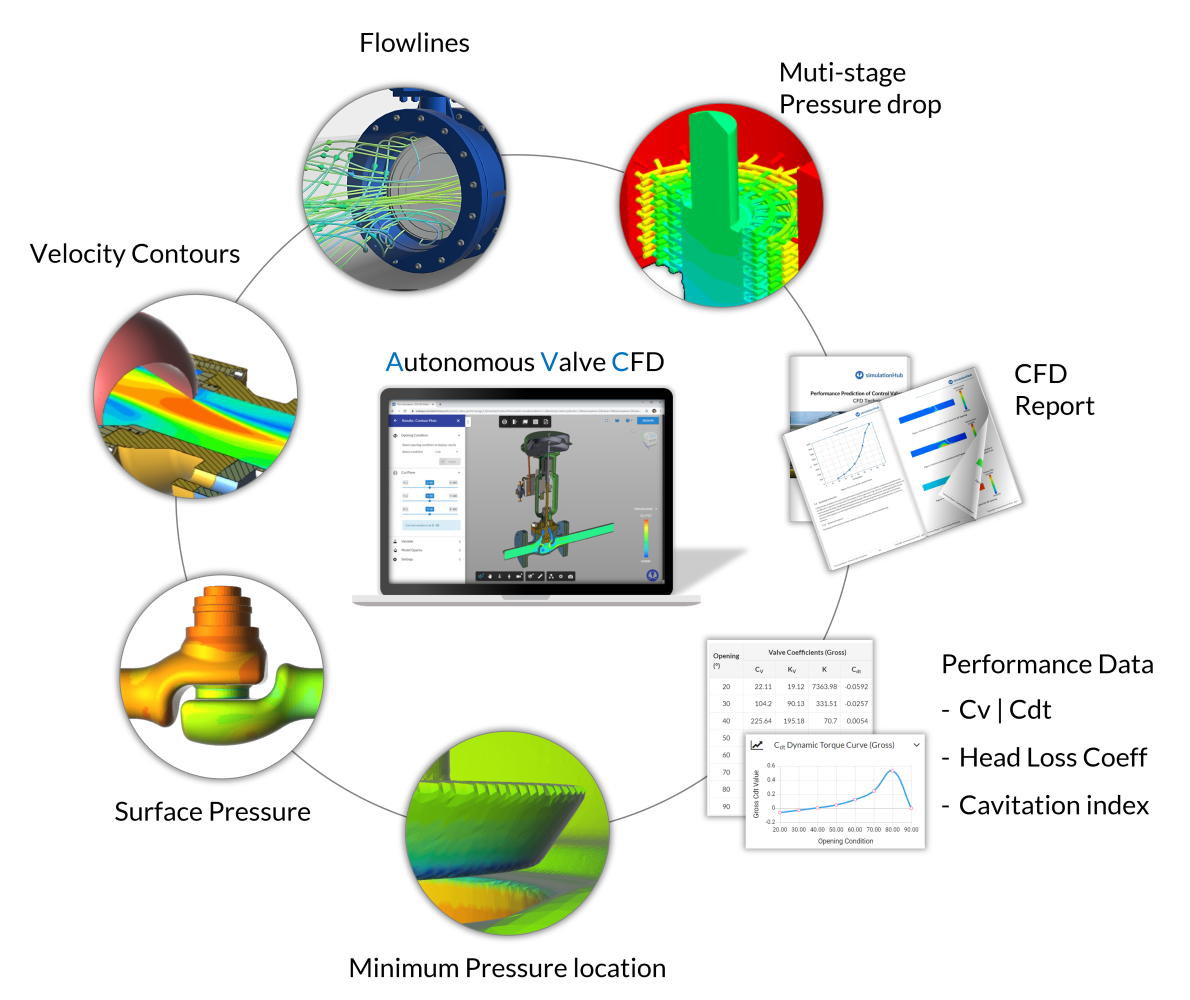
                    <div class="header small ui"><a href="https://www.simulationhub.com/autonomous-valve-cfd" target="_blank">Autonomous Valve CFD (AVC)</a> is built to close that gap. An engineer uploads the valve's CAD geometry in STP or STEP format along with the flow direction and opening conditions, and the platform runs the rest on its own - geometry cleanup, mesh generation, and CFD solving - without needing a CFD specialist involved. What comes back, typically inside thirty minutes, is the data that predicts slam and chatter risk: </div>
                    <div class="header small ui">
                       <ul>
                        <li><strong>Cv/Kv flow coefficients</strong> across the full opening range </li>
                        <li><strong>Hydrodynamic torque coefficient (Cdt)</strong> for accurate actuator sizing </li>
                        <li><strong>Cavitation index (σ)</strong> flagging where pressure risk exists </li>
                        <li><strong>Pressure and velocity contours</strong> showing how the valve genuinely behaves under the conditions specified </li>
                       </ul>
                    </div>
                    <div class="sixteen wide mobile sixteen wide tablet eight wide computer column min-width-50" style="width: 100%;">
                        <img class="ui huge centered rounded image"
                        src="https://static.simulationhub.com/prod/images/pages/blogs/2023/07-July/01-Valve-sizing-simplified-with-Autonomous-Valve-CFD/Results_provided_by%20_AVC.png"/>
                        <div style="color: #888; font-size: 0.7em; text-align: center; margin-top: 0.3em;">
                            Results provided by Autonomous Valve CFD
                         </div>
                    </div>
                    <div class="header small ui">All of it compiles into a single report benchmarked against ANSI/ISA-75.02 and IEC 60534-2-3. The practical shift is simple: instead of trusting that a selection should work, you get a result showing whether it does, for that exact valve, in that exact system, before a single part is machined. </div>
                    <div class="header large ui">
                        <strong>The Takeaway</strong>
                    </div>
                    <div class="header small ui">Slam and chatter aren't bad luck - they're diagnosable reactions to a valve that doesn't match its system, and most of the failure is preventable through correct sizing, selection, and installation. What used to take weeks of lab time or a specialist's open calendar slot to confirm can now be checked in about the time it takes to get coffee. The noise complaint in the maintenance log should be an exception, not the routine. </div>
                    <div class="header large ui">
                        <strong>See It on Your Own Valve</strong>
                    </div>
                    <div class="header small ui">The fastest way to know if a design will slam, chatter, or hold up under a pump trip is to run it - not assume it. <a href="https://www.simulationhub.com/autonomous-valve-cfd" target="_blank">Autonomous Valve CFD</a> lets you upload your own valve geometry and get Cv/Kv curves, cavitation risk, and closing dynamics back in under thirty minutes; no CFD specialist required. </div>
                    <div class="sixteen wide mobile sixteen wide tablet eight wide computer column min-width-50" style="width: 100%;">
                        <img class="ui huge centered rounded image"
                        src="https://static.simulationhub.com/prod/images/pages/blogs/2026/17-July/avc-key-features.png"/>
                        <div style="color: #888; font-size: 0.7em; text-align: center; margin-top: 0.3em;">
                            Autonomous Valve CFD (AVC) Key Features
                         </div>
                    </div>
                    <div class="header small ui"> If you're ready to go beyond handbook values, explore <a href="https://www.simulationhub.com/autonomous-valve-cfd" target="_blank">Autonomous Valve CFD (AVC)</a> and see how it generates certified C<sub>v</sub>, K<sub>v</sub>, C<sub>dt</sub>, and F<sub>L</sub> data directly from your CAD model - in under 30 minutes. Or schedule a guided walkthrough with our engineering team to see how AVC can fit into your valve design and validation workflow.</div>
                    <a class="left-align-text ui right labeled icon large primary button uppercase" href="https://www.simulationhub.com/autonomous-valve-cfd" target="_blank">
                        <i class="right chevron icon"></i>See What's New in AVC
                    </a>
                    <a class="left-align-text ui right labeled icon large primary button uppercase" href="https://www.simulationhub.com/contact-us?tab=autonomous-valve-cfd" target="_blank" style="margin-top: 10px;">
                        <i class="right chevron icon"></i>Book a Free Demo
                    </a>
                </div>
            </div>
        </div>
    </div>
    <!-- BLOG AUTHOR -->
    <div class="shbg-grey-pallet hundred ui segment stackable grid no-border no-padding no-margin no-radius no-shadow">
        <div class="row no-margin no-padding">
            <div class="sixteen wide mobile sixteen wide tablet sixteen wide computer column no-margin no-padding">
                <div class="container-fluid responsive-padding padding-large">
                    <div class="content-block vertical-align-top">
                        <div
                            class="inner-content custom-section-width sixteen-wide position-center container-limit max-width-boxed-layout">
                            <div class=" hide-on-tablet hide-on-computer">
    <img class="ui small circular centered image image-border size-small color-teal" src="https://static.simulationhub.com/prod/images/common/team-members/Akshay_Dorle.jpg" alt="Blog Author - Akshay Dorle">
    <div class="ui medium teal centered header font-weight-bold">
        Akshay Dorle
    </div>
    <div class="spaced" style="text-align: center">
        <a class="ui linkedin small icon button" target="_blank" href="https://www.linkedin.com/in/akshay-dorle-8b6611207/">
            <i class="linkedin icon"></i>
        </a>
    </div>
    <div class="ui small header">
        Akshay is the Business Manager for Autonomous Valve CFD (AVC) at simulationHub, CCTech’s specialized CFD platform for valve design and analysis. With over three years of experience at CCTech, he now leads client engagement, technical guidance, and product support for AVC. Akshay works closely with valve manufacturers and engineering teams to ensure successful adoption and meaningful results. He holds a Master’s degree in Mechanical Engineering from NIT Silchar and combines deep CFD knowledge with a strong focus on customer success and product growth. Akshay handles everything from client onboarding and technical discussions to product support and long-term relationship building
    </div>
</div>
<div class="sh-services-title hide-on-mobile">
    <div class="top-aligned image" style="width:200px;">
        <img class="ui fluid circular image image-border size-small color-teal" src="https://static.simulationhub.com/prod/images/common/team-members/Akshay_Dorle.jpg" alt="Blog Author - Akshay Dorle">
    </div>
    <div class="content">
        <div class="ui medium teal header font-weight-bold">
            Akshay Dorle
        </div>
        <div class="ui small header">
            Akshay is the Business Manager for Autonomous Valve CFD (AVC) at simulationHub, CCTech’s specialized CFD platform for valve design and analysis. With over three years of experience at CCTech, he now leads client engagement, technical guidance, and product support for AVC. Akshay works closely with valve manufacturers and engineering teams to ensure successful adoption and meaningful results. He holds a Master’s degree in Mechanical Engineering from NIT Silchar and combines deep CFD knowledge with a strong focus on customer success and product growth. Akshay handles everything from client onboarding and technical discussions to product support and long-term relationship building
        </div>
        <div class="spaced">
            <a class="ui linkedin small icon button" target="_blank" href="https://www.linkedin.com/in/akshay-dorle-8b6611207/">
                <i class="linkedin icon"></i>
            </a>
        </div>
    </div>
</div>
                        </div>
                    </div>
                </div>
            </div>
        </div>
    </div>
</div>]]></content><author><name>https://www.linkedin.com/in/akshay-dorle-8b6611207/</name></author><category term="simulationHub" /><category term="Autonomous Valve CFD" /><category term="CFD" /><category term="Cavitation" /><category term="Valve Design" /><category term="simulationHub" /><category term="Autonomous Valve CFD" /><category term="CFD" /><category term="Design software" /><category term="Valve Engineers" /><summary type="html"><![CDATA[A noisy check valve tells a story - slam, chatter, or vibration - and this blog carries that behavior into Autonomous Valve CFD (AVC)-led design verification before the line.]]></summary></entry><entry><title type="html">AVC 101 - A Free Foundation Course to Start Your Valve Flow Simulation Journey</title><link href="https://www.simulationhub.com/blog/avc-101-course" rel="alternate" type="text/html" title="AVC 101 - A Free Foundation Course to Start Your Valve Flow Simulation Journey" /><published>2026-07-13T04:30:00+00:00</published><updated>2026-07-13T04:30:00+00:00</updated><id>https://www.simulationhub.com/blog/avc-101-course</id><content type="html" xml:base="https://www.simulationhub.com/blog/avc-101-course"><![CDATA[<div class="shbg-pallet white ui segment stackable grid no-border no-padding no-margin no-radius no-shadow">
    <div class="row no-margin no-padding">
        <div class="sixteen wide mobile sixteen wide tablet sixteen wide computer column no-margin no-padding">
            <div class="container-fluid responsive-padding padding-large" style="padding-bottom: 0rem !important">
                <div class="content-block vertical-align-top">
                    <div
                        class="inner-content custom-section-width sixteen-wide position-center container-limit max-width-boxed-layout">
                        <div
                            class="shbg-pallet white ui segment stackable grid no-border no-padding no-margin no-radius no-shadow">
                            <div class="row no-margin no-padding">
                                <div
                                    class="sixteen wide mobile eight wide tablet eight wide computer column no-margin no-padding">
                                    <div class="container-fluid">
                                        <div class="content-block vertical-align-middle">
                                            <div class="inner-content custom-section-width sixteen-wide">
                                                <div class="sh-services-title">
    <div class="top-aligned image" style="width: 70px;">
        <img class="ui fluid circular image image-border size-mini color-teal" src="https://static.simulationhub.com/prod/images/common/team-members/praveen_kumar.jpg" alt="Blog Author - Praveen Kumar">
    </div>
    <div class="content">
        <div class="ui small header no-margin">
            Written by <span class="font-weight-bold text teal">Praveen Kumar</span>
        </div>
        <div class="ui small header custom-link color-blue font-weight-bold no-margin">
            <a href="https://twitter.com/Praveen06816" target="_blank">
                @Praveen06816
            </a>
        </div>
    </div>
</div>
                                            </div>
                                        </div>
                                    </div>
                                </div>
                                <div
                                    class="sixteen wide mobile eight wide tablet eight wide computer column no-margin no-padding hide-on-mobile">
                                    <div class="container-fluid">
                                        <div class="content-block vertical-align-middle">
                                            <div class="inner-content position-right text-align-right">
                                                <div class="ui small header no-margin">
                                                    Approximately
                                                </div>
                                                <div class="ui small teal header font-weight-bold no-margin">
                                                    2 Minutes Reading
                                                </div>
                                            </div>
                                        </div>
                                    </div>
                                </div>
                                <div
                                    class="sixteen wide mobile eight wide tablet eight wide computer column no-margin no-padding hide-on-tablet hide-on-computer">
                                    <div class="container-fluid">
                                        <div class="content-block vertical-align-middle">
                                            <div class="inner-content">
                                                <div class="ui small header no-margin">
                                                    Approximately
                                                </div>
                                                <div class="ui small teal header font-weight-bold no-margin">
                                                    2 Minutes Reading
                                                </div>
                                            </div>
                                        </div>
                                    </div>
                                </div>
                            </div>
                        </div>
                    </div>
                </div>
            </div>
        </div>
    </div>
</div>
<div class="shbg-pallet white ui segment stackable grid no-border no-padding no-margin no-radius no-shadow">
    <div class="row no-margin no-padding">
        <div class="sixteen wide mobile sixteen wide tablet sixteen wide computer column no-margin no-padding">
            <div class="container-fluid responsive-padding padding-large">
                <div class="content-block vertical-align-middle">
                    <div class="header large ui">
                        <strong>What is AVC 101 about?</strong>
                    </div>
                    <div class="header small ui">AVC 101 is a beginner-friendly course that explains the key concepts behind valve flow performance and virtual flow loop testing. This course explains how Autonomous Valve CFD (AVC) can be used to generate valve performance data through CFD simulations.</div>
                    <div class="header small ui">The best part? <strong>No prior CFD knowledge is required.</strong></div>
                    <div class="header small ui">The course covers important topics such as valve flow coefficient, hydrodynamic torque coefficient, physical flow loop testing, conventional CFD challenges, and the AVC workflow. </div>
                    <div class="header large ui">
                        <strong>What you will learn</strong>
                    </div>
                    <div class="header small ui">By completing this course, learners will be able to:</div>
                    <div class="header small ui">
                        <ul>
                            <li>Understand the <strong>Valve Flow Coefficient (Cv)</strong> and the <strong>Hydrodynamic Torque Coefficient (Cdt)</strong> and their role in valve sizing and flow capacity evaluation.</li>
                            <li>Learn how Cv and Cdt curves are generated through physical flow loop testing.</li>
                            <li>Discover the challenges involved in physical testing and conventional CFD simulation.</li>
                            <li>Learn how Autonomous Valve CFD helps simplify valve flow simulation using an automated, cloud-based workflow.</li>
                            <li>Complete a step-by-step tutorial to run the first valve flow simulation using AVC.</li>
                        </ul>
                    </div>
                    <div class="header large ui">
                        <strong>Course structure</strong>
                    </div>
                    <div class="header small ui">The course is divided into three simple sections:</div>
                    <div class="sixteen wide mobile sixteen wide tablet eight wide computer column min-width-50" style="width: 100%;">
                        <img class="ui huge centered rounded image"
                        src="https://static.simulationhub.com/prod/images/pages/blogs/2026/10-July/course-strucutre-table.png"/>
                    </div>
                    <div class="header large ui">
                        <strong>Hands-on Tutorial</strong>
                    </div>
                    <div class="header small ui">The course includes a practical, step-by-step tutorial for a <strong>DN400 Triple Offset Butterfly Valve</strong>.</div>
                    <div class="header small ui">In this tutorial, learners will activate their AVC trial, open the dashboard, upload the valve CAD model, define the required inputs, submit the simulation, and review the results. </div>
                    <div class="header small ui">The CAD file required for the tutorial is provided as a downloadable resource, along with a tutorial guide to help learners follow the complete workflow.</div>
                    <div class="header large ui">
                        <strong>Requirements</strong>
                    </div>
                    <div class="header small ui">No prior CFD knowledge is required. The course covers the necessary fundamentals before introducing the AVC workflow. </div>
                    <div class="header small ui">However, we strongly recommend taking the course on a <strong>laptop or desktop computer</strong>, especially if you want to follow the hands-on tutorial. The tutorial involves activating the AVC trial, accessing the app dashboard, downloading the CAD file, and running the simulation, which is not practical from a mobile device. </div>                    
                    <div class="header large ui">
                        <strong>Start learning</strong>
                    </div>
                    <div class="header small ui">The course is available on Udemy. You can access the course using the links below: </div>
                    <a class="left-align-text ui right labeled icon large primary button uppercase" href="https://www.udemy.com/course/avc-101-valve-flow-simulation-using-autonomous-valve-cfd/" target="_blank" style="background-color: #a435f0;">
                        <i class="right chevron icon"></i>Course on Udemy
                    </a>
                    <div class="header large ui">
                        <strong>Download Resources</strong>
                    </div>
                    <div class="header small ui">The course includes a practical, step-by-step tutorial for a DN400 Triple Offset Butterfly Valve. You can download the required supporting documents and CAD file here:</div>
                    <a class="left-align-text ui right labeled icon large primary button uppercase" href="https://static.simulationhub.com/prod/images/pages/blogs/2026/10-July/AVC-Trial-activation-steps.pdf" target="_blank">
                        <i class="right chevron icon"></i>Trial Activation Guide
                    </a>
                    <a class="left-align-text ui right labeled icon large primary button uppercase" href="https://static.simulationhub.com/prod/images/pages/blogs/2026/10-July/AVC-Tutorial-DN400-Triple-Offset-Butterfly-Valve.pdf" target="_blank">
                        <i class="right chevron icon"></i>Tutorial Guide
                    </a>
                    <a class="left-align-text ui right labeled icon large primary button uppercase" href="https://static.simulationhub.com/prod/images/pages/blogs/2026/10-July/TOBV-DN400.step">
                        <i class="right chevron icon"></i>CAD File - Butterfly Valve
                    </a>
                    <div class="header small ui">Complete the course, follow the tutorial, and add one more practical skill to your engineering toolkit. </div>
                    <div class="header small ui">Now you can not only design valves — you can also verify and understand their flow performance using AVC. </div>
                </div>
            </div>
        </div>
    </div>
    <!-- BLOG AUTHOR -->
    <div class="shbg-grey-pallet hundred ui segment stackable grid no-border no-padding no-margin no-radius no-shadow">
        <div class="row no-margin no-padding">
            <div class="sixteen wide mobile sixteen wide tablet sixteen wide computer column no-margin no-padding">
                <div class="container-fluid responsive-padding padding-large">
                    <div class="content-block vertical-align-top">
                        <div
                            class="inner-content custom-section-width sixteen-wide position-center container-limit max-width-boxed-layout">
                            <div class=" hide-on-tablet hide-on-computer">
    <img class="ui small circular centered image image-border size-small color-teal" src="https://static.simulationhub.com/prod/images/common/team-members/praveen_kumar.jpg" alt="Blog Author - Praveen Kumar">
    <div class="ui medium teal centered header font-weight-bold">
        Praveen Kumar
    </div>
    <div class="spaced" style="text-align: center">
        <a class="ui facebook small icon button" target="_blank" href="https://www.facebook.com/praveenkumar.r.1422">
            <i class="facebook f icon"></i>
        </a>
        <a class="ui twitter small icon button" target="_blank" href="https://twitter.com/Praveen06816">
            <i class="twitter icon"></i>
        </a>
        <a class="ui linkedin small icon button" target="_blank" href="https://www.linkedin.com/pub/praveen-kumar/4/ba3/560">
            <i class="linkedin icon"></i>
        </a>
    </div>
    <div class="ui small header">
        Praveen is a seasoned Product Marketing Manager at simulationHub, with over 15 years of experience in the field of Computational Fluid Dynamics (CFD). His expertise spans a wide range of applications, including Valves, HVAC, and more. As a Mechanical Engineer, Praveen has a solid technical foundation, complemented by a Post Graduate Certification in Product Management from IIM Indore. His extensive background allows him to bridge the gap between technical intricacies and market needs, helping businesses drive innovation and deliver impactful solutions.
    </div>
</div>
<div class="sh-services-title hide-on-mobile">
    <div class="top-aligned image" style="width:200px;">
        <img class="ui fluid circular image image-border size-small color-teal" src="https://static.simulationhub.com/prod/images/common/team-members/praveen_kumar.jpg" alt="Blog Author - Praveen Kumar">
    </div>
    <div class="content">
        <div class="ui medium teal header font-weight-bold">
            Praveen Kumar
        </div>
        <div class="ui small header">
            Praveen is a seasoned Product Marketing Manager at simulationHub, with over 15 years of experience in the field of Computational Fluid Dynamics (CFD). His expertise spans a wide range of applications, including Valves, HVAC, and more. As a Mechanical Engineer, Praveen has a solid technical foundation, complemented by a Post Graduate Certification in Product Management from IIM Indore. His extensive background allows him to bridge the gap between technical intricacies and market needs, helping businesses drive innovation and deliver impactful solutions.
        </div>
        <div class="spaced">
            <a class="ui facebook small icon button" target="_blank" href="https://www.facebook.com/praveenkumar.r.1422">
                <i class="facebook f icon"></i>
            </a>
            <a class="ui twitter small icon button" target="_blank" href="https://twitter.com/Praveen06816">
                <i class="twitter icon"></i>
            </a>
            <a class="ui linkedin small icon button" target="_blank" href="https://www.linkedin.com/pub/praveen-kumar/4/ba3/560">
                <i class="linkedin icon"></i>
            </a>
        </div>
    </div>
</div>
                        </div>
                    </div>
                </div>
            </div>
        </div>
    </div>
</div>]]></content><author><name>https://www.linkedin.com/in/praveen-kumar/</name></author><category term="simulationHub" /><category term="Autonomous Valve CFD" /><category term="CFD" /><category term="Cavitation" /><category term="Valve Design" /><category term="simulationHub" /><category term="Autonomous Valve CFD" /><category term="CFD" /><category term="Design software" /><category term="Valve Engineers" /><summary type="html"><![CDATA[simulationHub has launched AVC 101: Valve Flow Simulation Using Autonomous Valve CFD—a free course for valve design engineers, manufacturers, product development teams, and CFD practitioners seeking a practical understanding of valve flow performance.]]></summary></entry><entry><title type="html">Autonomous Valve CFD: Making Valve Simulation Repeatable, Faster, and Designer Friendly</title><link href="https://www.simulationhub.com/blog/why-avc" rel="alternate" type="text/html" title="Autonomous Valve CFD: Making Valve Simulation Repeatable, Faster, and Designer Friendly" /><published>2026-07-07T04:30:00+00:00</published><updated>2026-07-07T04:30:00+00:00</updated><id>https://www.simulationhub.com/blog/why-avc</id><content type="html" xml:base="https://www.simulationhub.com/blog/why-avc"><![CDATA[<div class="shbg-pallet white ui segment stackable grid no-border no-padding no-margin no-radius no-shadow">
    <div class="row no-margin no-padding">
        <div class="sixteen wide mobile sixteen wide tablet sixteen wide computer column no-margin no-padding">
            <div class="container-fluid responsive-padding padding-large" style="padding-bottom: 0rem !important">
                <div class="content-block vertical-align-top">
                    <div
                        class="inner-content custom-section-width sixteen-wide position-center container-limit max-width-boxed-layout">
                        <div
                            class="shbg-pallet white ui segment stackable grid no-border no-padding no-margin no-radius no-shadow">
                            <div class="row no-margin no-padding">
                                <div
                                    class="sixteen wide mobile eight wide tablet eight wide computer column no-margin no-padding">
                                    <div class="container-fluid">
                                        <div class="content-block vertical-align-middle">
                                            <div class="inner-content custom-section-width sixteen-wide">
                                                <div class="sh-services-title">
    <div class="top-aligned image" style="width: 70px;">
        <img class="ui fluid circular image image-border size-mini color-teal" src="https://static.simulationhub.com/prod/images/common/team-members/praveen_kumar.jpg" alt="Blog Author - Praveen Kumar">
    </div>
    <div class="content">
        <div class="ui small header no-margin">
            Written by <span class="font-weight-bold text teal">Praveen Kumar</span>
        </div>
        <div class="ui small header custom-link color-blue font-weight-bold no-margin">
            <a href="https://twitter.com/Praveen06816" target="_blank">
                @Praveen06816
            </a>
        </div>
    </div>
</div>
                                            </div>
                                        </div>
                                    </div>
                                </div>
                                <div
                                    class="sixteen wide mobile eight wide tablet eight wide computer column no-margin no-padding hide-on-mobile">
                                    <div class="container-fluid">
                                        <div class="content-block vertical-align-middle">
                                            <div class="inner-content position-right text-align-right">
                                                <div class="ui small header no-margin">
                                                    Approximately
                                                </div>
                                                <div class="ui small teal header font-weight-bold no-margin">
                                                    5 Minutes Reading
                                                </div>
                                            </div>
                                        </div>
                                    </div>
                                </div>
                                <div
                                    class="sixteen wide mobile eight wide tablet eight wide computer column no-margin no-padding hide-on-tablet hide-on-computer">
                                    <div class="container-fluid">
                                        <div class="content-block vertical-align-middle">
                                            <div class="inner-content">
                                                <div class="ui small header no-margin">
                                                    Approximately
                                                </div>
                                                <div class="ui small teal header font-weight-bold no-margin">
                                                    5 Minutes Reading
                                                </div>
                                            </div>
                                        </div>
                                    </div>
                                </div>
                            </div>
                        </div>
                    </div>
                </div>
            </div>
        </div>
    </div>
</div>
<div class="shbg-pallet white ui segment stackable grid no-border no-padding no-margin no-radius no-shadow">
    <div class="row no-margin no-padding">
        <div class="sixteen wide mobile sixteen wide tablet sixteen wide computer column no-margin no-padding">
            <div class="container-fluid responsive-padding padding-large">
                <div class="content-block vertical-align-middle">
                    <div class="header small ui">Every valve design team understands the pressure of a high-stakes product launch. The valve design must be locked, performance data must be generated, reports must be prepared, and the review is already on the calendar.</div>
                    <div class="header small ui">This is exactly when Computational Fluid Dynamics (CFD) is supposed to help the team move faster. It should support faster design iteration, validate performance, compare alternatives, and give engineers confidence before committing to a final design. But in many organizations, the conventional CFD workflow itself becomes part of the bottleneck due to its vicious cycle of manual labour. A gruelling sequence of CAD cleanup, fluid volume extraction, meshing, boundary conditions, turbulence model selection, solver convergence, HPC time, post-processing, and report writing all demand time and expertise. Each step is necessary, but together they can become a heavy cart that the design team has to push while the product release deadline keeps moving closer.</div>
                    <div class="header small ui">For teams without in-house CFD capability, the pressure looks different but often lands in the same place. Physical flow loop testing can take months and a significant budget to validate a single design point. Outsourcing to a consultancy is faster than building a prototype, but it still means a multi-week turnaround and a report handed back with limited visibility into how the number was actually reached - another design cycle spent waiting on someone outside the team.</div>
                    <div class="header small ui">Either way, when leadership suggests CFD process improvements, the response from the team is usually the same:<strong> “No time. We are busy with the product launch.”</strong></div>
                    <div class="header small ui">The team is not resisting improvement. They are so consumed by the sheer manual labour of pulling the heavy, clunky cart of conventional CFD workflows. The heavy cart is not only slow because it is overloaded. It is slow because every square wheel represents a manual decision point. And every manual decision point introduces the possibility of variation.</div>
                    <div class="header large ui">
                        <strong>When the User Becomes the Variable</strong>
                    </div>
                    <div class="header small ui">When a complex valve simulation crashes or produces an unexpected result, the first instinct is often to blame the software. But in conventional CFD workflows, the more uncomfortable truth is that the user can become one of the greatest sources of uncertainty.</div>
                    
                    <div class="sixteen wide mobile sixteen wide tablet eight wide computer column min-width-50" style="width: 100%;">
                        <img class="ui huge centered rounded image"
                        src="https://static.simulationhub.com/prod/images/pages/blogs/2026/7-July/cfd-users-uncertainity.png"/>
                        <div style="color: #888; font-size: 0.7em; text-align: center; margin-top: 0.3em;">
                            CFD Users Uncertainty
                         </div>
                    </div>
                    <div class="header small ui">The process depends too heavily on individual users’ experience. Mesh strategy, boundary conditions, turbulence model selection, convergence criteria, y+ requirements, material assumptions, and post-processing methods can all influence the final result. When these decisions are made manually, two users can follow broadly similar intentions and still arrive at different answers.</div>
                    <div class="header small ui">In this environment, the simulation is no longer a pure reflection of physics; it is also a reflection of the person behind the screen.</div>
                    <div class="header large ui">
                        <strong>CFD is Colourful. But it is Not Art.</strong>
                    </div>
                    <div class="header small ui">CFD results often look beautiful and colourful. Velocity contours, pressure fields, streamlines, and flow patterns can look impressive. But CFD is not art. It is science. And science should be repeatable by anyone who follows the correct process.</div>
                    <div class="header small ui">This is where conventional CFD can become difficult for product development teams. The conventional simulation workflows require a long chain of subjective micro-decisions: how fine the mesh is, which turbulence model to use, whether the Y+ criteria are met, whether the results converged... The physics is scientific, but the workflow often behaves like a craft that depends on the skill of the individual user.</div>
                    
                    <div class="sixteen wide mobile sixteen wide tablet eight wide computer column min-width-50" style="width: 100%;">
                        <img class="ui huge centered rounded image"
                        src=" https://static.simulationhub.com/prod/images/pages/blogs/2026/7-July/same-valve-different-users.png"/>
                        <div style="color: #888; font-size: 0.7em; text-align: center; margin-top: 0.3em;">
                            Same valve. Different user. Differet Cv.
                         </div>
                    </div>
                    <div class="header small ui">Consider the exact same valve geometry analyzed by three different engineers. A beginner may rely on default settings and a coarse mesh. An intermediate user may refine the mesh and try a different turbulence model. An expert may spend days checking mesh independence, monitoring convergence, and validating assumptions.</div>
                    <div class="header small ui"><strong>Same valve. Same physics. Different users. Different Cv.</strong></div>
                    <div class="header small ui">For product development, that is a serious risk. If the valve has not changed, the operating condition has not changed, and the physics has not changed, the result should not vary significantly because of who ran the simulation. When results become user-dependent, simulation data becomes harder to trust for release decisions, customer commitments, and design optimization.</div>
                    <div class="header small ui">Now ask the harder question: which of those three engineers is running your next valve simulation? And are you willing to bet a product release on the answer? Can the team afford to keep doing CFD the old way?</div>
                    <div class="header large ui">
                        <strong>The Shift to Autonomous CFD</strong>
                    </div>
                    <div class="header small ui">This is where Autonomous CFD becomes important.</div>
                    <div class="header small ui">Autonomous CFD is not just about automating workflows or running simulations faster. Speed matters, but the greater value is standardization. An autonomous process brings intelligence into the simulation workflow by guiding critical decisions such as mesh refinement, turbulence model selection, and convergence handling. This reduces user-to-user variation and helps ensure that the same valve inputs lead to the same reliable engineering output.</div>
                    <div class="header small ui">It does not remove engineering judgment from valve design. It removes avoidable uncertainty from routine simulation setup. Engineering judgment should be applied where it matters most: comparing design alternatives, interpreting performance, understanding trade-offs, and making confident product decisions.</div>
                    <div class="header large ui">
                        <strong>Explore Autonomous Valve CFD (AVC)</strong>
                    </div>
                    <div class="header small ui">Autonomous Valve CFD (AVC) is a specialized app for valve simulations and virtual flow loop testing, built to help valve design teams standardize simulation workflows, reduce expert dependency, and generate repeatable valve performance insights faster.</div>
                    <div class="sixteen wide mobile sixteen wide tablet eight wide computer column min-width-50" style="width: 100%;">
                        <img class="ui huge centered rounded image"
                        src="https://static.simulationhub.com/prod/images/pages/blogs/2026/7-July/avc-key-features.png"/>
                        <div style="color: #888; font-size: 0.7em; text-align: center; margin-top: 0.3em;">
                            AVC Key Features
                         </div>
                    </div>
                    <div class="header small ui">AVC's autonomous workflow automates CAD cleanup, fluid volume extraction, meshing, and solver convergence, trained specifically on different valve geometries, following recognized flow-testing standards, so that the workflow itself determines the result and not the individual running it.</div>
                    <div class="header small ui">What that looks like in practice:</div>
                    <div class="header small ui">
                        <ul>
                            <li>Same valve, same inputs, same answer — every time, regardless of who submits the job</li>
                            <li>Full simulations in under 1-2 hrs, compared with 3–5 days for a manual CFD study or 3–4 months for physical flow loop testing</li>
                            <li>No CAD cleanup and no in-house HPC — upload the CAD model, set flow direction and opening conditions, done</li>
                            <li>Cv, Kv, Cdt, cavitation index, and full pressure/velocity fields, delivered with a complete technical report</li>
                        </ul>
                    </div>
                    <div class="header small ui">For valve design teams, this changes the role of CFD in the product development cycle. CFD no longer remains a specialist-gated checkpoint at the end of the design process. It becomes a practical design tool that engineers use earlier and more often to compare options, estimate Cv, understand pressure drop, evaluate performance, and reduce uncertainty before physical testing.</div>
                    <div class="header small ui">That is the real shift: From manual bottlenecks to automated workflows. From expert-dependent to standardized. From "who ran this simulation?" to "what does the simulation say?"</div>
                    <div class="header small ui">In a competitive market, uncertainty is a liability. Reduce your time-to-market, eliminate human error, and secure your product release. Don't let your simulation tools be the reason you miss your next product deadline.</div>
                    <div class="header small ui">This is where Autonomous Valve CFD becomes important.</div>
                    <div class="header small ui">Schedule a call with our product expert to discover how Autonomous Valve CFD can support your valve design process, improve design iteration, and bring more confidence before product release.</div>
                    <a class="left-align-text ui right labeled icon large primary button uppercase" href="https://www.simulationhub.com/autonomous-valve-cfd" target="_blank">
                        <i class="right chevron icon"></i>Explore the Updated AVC Website
                    </a>
                    <a class="left-align-text ui right labeled icon large primary button uppercase" href="https://www.simulationhub.com/contact-us?tab=autonomous-valve-cfd" target="_blank" style="margin-top: 10px;">
                        <i class="right chevron icon"></i>Book a Free Demo
                    </a>
                </div>
            </div>
        </div>
    </div>
    <!-- BLOG AUTHOR -->
    <div class="shbg-grey-pallet hundred ui segment stackable grid no-border no-padding no-margin no-radius no-shadow">
        <div class="row no-margin no-padding">
            <div class="sixteen wide mobile sixteen wide tablet sixteen wide computer column no-margin no-padding">
                <div class="container-fluid responsive-padding padding-large">
                    <div class="content-block vertical-align-top">
                        <div
                            class="inner-content custom-section-width sixteen-wide position-center container-limit max-width-boxed-layout">
                            <div class=" hide-on-tablet hide-on-computer">
    <img class="ui small circular centered image image-border size-small color-teal" src="https://static.simulationhub.com/prod/images/common/team-members/praveen_kumar.jpg" alt="Blog Author - Praveen Kumar">
    <div class="ui medium teal centered header font-weight-bold">
        Praveen Kumar
    </div>
    <div class="spaced" style="text-align: center">
        <a class="ui facebook small icon button" target="_blank" href="https://www.facebook.com/praveenkumar.r.1422">
            <i class="facebook f icon"></i>
        </a>
        <a class="ui twitter small icon button" target="_blank" href="https://twitter.com/Praveen06816">
            <i class="twitter icon"></i>
        </a>
        <a class="ui linkedin small icon button" target="_blank" href="https://www.linkedin.com/pub/praveen-kumar/4/ba3/560">
            <i class="linkedin icon"></i>
        </a>
    </div>
    <div class="ui small header">
        Praveen is a seasoned Product Marketing Manager at simulationHub, with over 15 years of experience in the field of Computational Fluid Dynamics (CFD). His expertise spans a wide range of applications, including Valves, HVAC, and more. As a Mechanical Engineer, Praveen has a solid technical foundation, complemented by a Post Graduate Certification in Product Management from IIM Indore. His extensive background allows him to bridge the gap between technical intricacies and market needs, helping businesses drive innovation and deliver impactful solutions.
    </div>
</div>
<div class="sh-services-title hide-on-mobile">
    <div class="top-aligned image" style="width:200px;">
        <img class="ui fluid circular image image-border size-small color-teal" src="https://static.simulationhub.com/prod/images/common/team-members/praveen_kumar.jpg" alt="Blog Author - Praveen Kumar">
    </div>
    <div class="content">
        <div class="ui medium teal header font-weight-bold">
            Praveen Kumar
        </div>
        <div class="ui small header">
            Praveen is a seasoned Product Marketing Manager at simulationHub, with over 15 years of experience in the field of Computational Fluid Dynamics (CFD). His expertise spans a wide range of applications, including Valves, HVAC, and more. As a Mechanical Engineer, Praveen has a solid technical foundation, complemented by a Post Graduate Certification in Product Management from IIM Indore. His extensive background allows him to bridge the gap between technical intricacies and market needs, helping businesses drive innovation and deliver impactful solutions.
        </div>
        <div class="spaced">
            <a class="ui facebook small icon button" target="_blank" href="https://www.facebook.com/praveenkumar.r.1422">
                <i class="facebook f icon"></i>
            </a>
            <a class="ui twitter small icon button" target="_blank" href="https://twitter.com/Praveen06816">
                <i class="twitter icon"></i>
            </a>
            <a class="ui linkedin small icon button" target="_blank" href="https://www.linkedin.com/pub/praveen-kumar/4/ba3/560">
                <i class="linkedin icon"></i>
            </a>
        </div>
    </div>
</div>
                        </div>
                    </div>
                </div>
            </div>
        </div>
    </div>
</div>]]></content><author><name>https://www.linkedin.com/in/praveen-kumar/</name></author><category term="simulationHub" /><category term="Autonomous Valve CFD" /><category term="CFD" /><category term="Cavitation" /><category term="Valve Design" /><category term="simulationHub" /><category term="Autonomous Valve CFD" /><category term="CFD" /><category term="Design software" /><category term="Valve Engineers" /><summary type="html"><![CDATA[Discover how AVC eliminates simulation bottlenecks by standardizing CFD workflows for consistent, repeatable results. Learn why reliable engineering decisions depend on more than just faster simulations.]]></summary></entry><entry><title type="html">Converting Natural Language into Simulation-Ready HVAC Model using Buildings AI</title><link href="https://www.simulationhub.com/blog/inside-hvac-canvas-ai-assitant" rel="alternate" type="text/html" title="Converting Natural Language into Simulation-Ready HVAC Model using Buildings AI" /><published>2026-07-05T22:51:54+00:00</published><updated>2026-07-05T22:51:54+00:00</updated><id>https://www.simulationhub.com/blog/inside-hvac-canvas-ai-assitant</id><content type="html" xml:base="https://www.simulationhub.com/blog/inside-hvac-canvas-ai-assitant"><![CDATA[<div class="shbg-pallet white ui segment stackable grid no-border no-padding no-margin no-radius no-shadow">
    <div class="row no-margin no-padding">
        <div class="sixteen wide mobile sixteen wide tablet sixteen wide computer column no-margin no-padding">
            <div class="container-fluid responsive-padding padding-large" style="padding-bottom: 0rem !important">
                <div class="content-block vertical-align-top">
                    <div
                        class="inner-content custom-section-width sixteen-wide position-center container-limit max-width-boxed-layout">
                        <div
                            class="shbg-pallet white ui segment stackable grid no-border no-padding no-margin no-radius no-shadow">
                            <div class="row no-margin no-padding">
                                <div
                                    class="sixteen wide mobile eight wide tablet eight wide computer column no-margin no-padding">
                                    <div class="container-fluid">
                                        <div class="content-block vertical-align-middle">
                                            <div class="inner-content custom-section-width sixteen-wide">
                                                <div class="inner-content custom-section-width sixteen-wide">
    <div class="sh-services-title">
        <div class="top-aligned image" style="width: 70px;">
            <img class="ui fluid circular image image-border size-mini color-teal" src="https://static.simulationhub.com/prod/images/common/team-members/aaditya_ruiker.jpg" alt="Blog Author - Aaditya Ruiker">
        </div>
        <div class="content">
            <div class="ui small header no-margin">
                Written by <span class="font-weight-bold text teal">Aaditya Ruiker</span>
            </div>
            <div class="ui small header custom-link color-blue font-weight-bold no-margin">
                <a href="https://twitter.com/AadityaRuikar" target="_blank">
                    @AadityaRuikar
                </a>
            </div>
        </div>
    </div>
</div>
                                            </div>
                                        </div>
                                    </div>
                                </div>
                                <div
                                    class="sixteen wide mobile eight wide tablet eight wide computer column no-margin no-padding hide-on-mobile">
                                    <div class="container-fluid">
                                        <div class="content-block vertical-align-middle">
                                            <div class="inner-content position-right text-align-right">
                                                <div class="ui small header no-margin">
                                                    Approximately
                                                </div>
                                                <div class="ui small teal header font-weight-bold no-margin">
                                                    5 Minutes Reading
                                                </div>
                                            </div>
                                        </div>
                                    </div>
                                </div>
                                <div
                                    class="sixteen wide mobile eight wide tablet eight wide computer column no-margin no-padding hide-on-tablet hide-on-computer">
                                    <div class="container-fluid">
                                        <div class="content-block vertical-align-middle">
                                            <div class="inner-content">
                                                <div class="ui small header no-margin">
                                                    Approximately
                                                </div>
                                                <div class="ui small teal header font-weight-bold no-margin">
                                                    5 Minutes Reading
                                                </div>
                                            </div>
                                        </div>
                                    </div>
                                </div>
                            </div>
                        </div>
                    </div>
                </div>
            </div>
        </div>
    </div>
</div>
<div class="shbg-pallet white ui segment stackable grid no-border no-padding no-margin no-radius no-shadow">
    <div class="row no-margin no-padding">
        <div class="sixteen wide mobile sixteen wide tablet sixteen wide computer column no-margin no-padding">
            <div class="container-fluid responsive-padding padding-large">
                <div class="content-block vertical-align-middle">
                    <div class="header small ui">This is Part 2 of the HVAC Canvas blog series. In Part 1, we introduced HVAC Canvas as the visual workspace inside <a href="https://www.simulationhub.com/buildings-ai" target="_blank">Buildings AI</a> for designing and exploring HVAC systems with more flexibility than static templates allow. This article goes one level deeper: how the HVAC Canvas AI Assistant turns a plain-language system brief into a simulation-ready model, while keeping engineers in control at every checkpoint. Click the link below to read Part 1.</div>
                    <div class="header small ui">Before any energy or load calculation can run, an engineer needs a complete HVAC system model - every component selected, every parameter set, every connection wired, all of it matching an exact schema the simulation engine will accept. That single prerequisite is where most projects lose time. The HVAC Canvas AI Assistant, part of the <a href="https://www.simulationhub.com/buildings-ai" target="_blank">Buildings AI</a> platform from simulationHub, is built to collapse that prerequisite from hours of manual configuration into a conversation.</div>
                    <a class="left-align-text ui right labeled icon large primary button uppercase" href="https://www.simulationhub.com/blog/detailed_hvac_canvas" target="_blank" style="margin-top: 10px;">
                        <i class="right chevron icon"></i>Read Part 01 Blog - Inside HVAC Canvas by Buildings AI
                    </a>
                    <div class="header large ui">
                        <strong>The bottleneck isn't the simulation - it's getting to a valid model</strong>
                    </div>
                    <div class="header small ui">Across AEC and HVAC workflows, the same four leaks show up repeatedly: expertise locked in a few people, hours lost to setup and formatting, expensive expert time on slow turnaround, and full rework every time a design variant change. HVAC modeling concentrates all four tasks into one task. Building a model today means four manual steps, each with its own failure mode:</div>
                    <div class="header small ui">
                        <ul>
                            <li><strong>Component selection</strong> - picking the right types (AHUs, fan coil units, cooling towers, ducts, fans, pumps, boilers, VAV boxes, thermostats) from a large library, before any sizing logic is even possible. </li>
                            <li><strong>Parameter entry</strong> - setting dozens of values per component (supply air flow rate, cooling/heating capacity, fan efficiency, external static pressure, supply/return air temperatures) in one field at a time. </li>
                            <li><strong>System wiring</strong> - connecting AHUs to heating/cooling coils, supply and return ducts, fans, and zones correctly, where a single wrong connection invalidates the whole loop. </li>
                            <li><strong>Export validation</strong> - passing the model through a strict, case-sensitive schema check (component completeness, valid connections, naming rules, units, required fields) before simulation can even start.</li>
                        </ul>
                    </div>
                    <div class="sixteen wide mobile sixteen wide tablet eight wide computer column min-width-50" style="width: 100%;">
                        <img class="ui giant centered rounded image"
                        src="https://static.simulationhub.com/prod/images/pages/blogs/2026/6-July/manual-hvac-bottleneck.png"/>
                    </div>
                    <div class="header small ui">Get any one of these wrongs, and the model doesn't simulate. Get it right manually, and you've spent the kind of time that should be going into design iteration, not data entry.</div>
                    <div class="header large ui">
                        <strong>The use case: describe it, get back a validated model</a></strong>
                    </div>
                    <div class="header small ui">The workflow the Assistant enables is a plain-language brief in, a simulation-ready model out: </div>
                    <div class="header small ui" style="color: rgb(54, 74, 99);"><strong><i>"Design a VAV system for a medium office building with one rooftop air handling unit. Include a cooling coil and heating coil. Supply air to two zones. Use variable air volume boxes with reheat. Include return and exhaust fan. Optimize energy efficiency."</strong></i></div>
                    <div class="header small ui">From that single brief, the HVAC Canvas AI Assistant returns components selected, parameters filled, and connections wired — in the exact format the canvas consumes, with a system diagram and full component/parameter/connection lists generated in the same pass. The load calculation runs in the same session, no format translation step in between.</div>
                    <div class="inner-content position-center text-align-center" style="  position: relative;overflow: hidden;width: 100%;padding-top: 56.25%; ">
                            <iframe
                                style=" position: absolute;top: 0;left: 0;bottom: 0; right: 0; width: 100%;height: 100%;border: none;"
                                src="https://www.youtube.com/embed/Up2yUzm330A?si=WQcaWdoM9q2_AXvU" title="HVAC Canvas AI Assistant Demo Video" frameborder="0"
                                allow="accelerometer; autoplay; clipboard-write; encrypted-media; gyroscope; picture-in-picture"
                                allowfullscreen>
                            </iframe>
                    </div>
                    <div class="header large ui">
                        <strong>What makes this useful: it asks instead of guessing</strong>
                    </div>
                    <div class="header small ui">The most important design decision in this Assistant isn't the generation — it's the three points where it deliberately stops and hands control back:</div>
                    <div class="header small ui">
                        <ul>
                            <li><strong>Proposed layout review</strong> — "Here are the components and where they go. Does this look correct? The Assistant groups components by function (air handling, plant, zones) and waits for confirmation before placing anything.</li>
                            <li><strong>Missing values prompted</strong> — "I couldn't determine these. Please provide them." Rather than defaulting ambiguous values like chilled water supply temperature or boiler efficiency, it surfaces exactly what's missing, organized by system area, and asks. </li>
                            <li><strong>Ambiguous connection resolution</strong> — "This could connect to either plant. Which one? When a component like an AHU could legitimately tie into Plant A or Plant B, the Assistant presents both options side-by-side and requires an explicit selection rather than inferring one. </li>
                        </ul>
                    </div>
                    <div class="sixteen wide mobile sixteen wide tablet eight wide computer column min-width-50" style="width: 100%;">
                        <img class="ui giant centered rounded image"
                        src="https://static.simulationhub.com/prod/images/pages/blogs/2026/6-July/feature-validation-system.png"/>
                    </div>
                    <div class="header small ui">This isn't a black-box generator that hands you a finished file. It's closer to a competent junior engineer who builds fast, but flags exactly the decisions that need a senior judgment call. That distinction — generation paired with structured human-in-the-loop checkpoints — is the actual USP, more than the speed itself.</div>
                    <div class="header large ui">
                        <strong>The architecture: orchestrator, specialists, guardrails </strong>
                    </div>
                    <div class="header small ui">Under the hood, this runs as a multi-agent system rather than a single generative pass: </div>
                    <div class="header small ui">
                        <ul>
                            <li>A <strong>ConductorAgent</strong> (orchestrator) reads the brief, plans the workflow, and routes only the work that's needed. </li>
                            <li>Three specialist agents execute in parallel: a <strong>PlacementAgent</strong> (what equipment goes where), a <strong>ParameterAgent</strong> (fills every parameter), and a <strong>ConnectionAgent</strong> (wires every connection end to end). </li>
                            <li>Each specialist output passes through a review gate — the same layout, missing-values, and ambiguous-connection checkpoints described above — before the result is marked in a validated, simulation-ready design in the exact canvas format.</li>
                        </ul>
                    </div>
                    <div class="sixteen wide mobile sixteen wide tablet eight wide computer column min-width-50" style="width: 100%;">
                        <img class="ui giant centered rounded image"
                        src="https://static.simulationhub.com/prod/images/pages/blogs/2026/6-July/feature-model-architecture.png"/>
                    </div>
                    <div class="header small ui">This is what makes the "always-valid output" claim credible rather than aspirational: validation isn't a final export check bolted onto the end; it's built into how each agent's work gets accepted.</div>
                    <div class="header large ui">
                        <strong>Why these matters</strong>
                    </div>
                    <div class="header small ui">The value of the HVAC Canvas AI Assistant is not that it adds another layer to the workflow. It removes one. Instead of spending hours choosing components, entering values, fixing broken connections, and checking export rules, the engineer starts with intent. </div>
                    <div class="header small ui">The Assistant turns that intent into a model the canvas can work with, while still pausing human decisions where engineering judgment matters. That is the practical shift: less manual setup, fewer invalid models, and faster movement from design idea to simulation. </div>
                    <div class="header medium ui"><strong>You can also watch our on-demand webinar recording on the HVAC Canvas AI Assistant to see the workflow in action.</strong></div>
                    <div class="sixteen wide mobile sixteen wide tablet eight wide computer column min-width-50" style="width: 100%;">
                        <a href="https://www.simulationhub.com/webinars/recorded/hvac-canvas-ai-assistant" target="_blank">
                            <img class="ui huge centered rounded image" style="margin-bottom: 10px;"
                            src="https://static.simulationhub.com/prod/images/pages/webinars/2026/25-June/hvac-canvas-ai-assitant-hero.png"/>
                        </a>
                    </div>
                    <a class="left-align-text ui right labeled icon large primary button uppercase" href="https://www.simulationhub.com/webinars/recorded/hvac-canvas-ai-assistant" target="_blank">
                        <i class="right chevron icon"></i>Watch the Webinar Recording
                    </a>
                    <div class="header small ui">Want to know more or explore how <a href="https://www.simulationhub.com/buildings-ai" target="_blank">Buildings AI</a> can optimize your HVAC workflow? Visit <a href="https://www.simulationhub.com/buildings-ai" target="_blank"></a><a href="https://www.simulationhub.com/buildings-ai" target="_blank">Buildings AI</a></a> and schedule a free demo — show us your workflow, and we’ll guide you through it. </div>
                    <a class="left-align-text ui right labeled icon large primary button uppercase" href="https://www.simulationhub.com/buildings-ai" target="_blank">
                        <i class="right chevron icon"></i>Explore Buildings AI
                    </a>
                    <a class="left-align-text ui right labeled icon large primary button uppercase" href="https://www.simulationhub.com/contact-us?tab=buildings-ai" target="_blank" style="margin-top: 10px;">
                        <i class="right chevron icon"></i>Schedule a Demo call
                    </a>
                </div>
            </div>
        </div>
    </div>
    <!-- BLOG AUTHOR -->
    <div class="shbg-grey-pallet hundred ui segment stackable grid no-border no-padding no-margin no-radius no-shadow">
        <div class="row no-margin no-padding">
            <div class="sixteen wide mobile sixteen wide tablet sixteen wide computer column no-margin no-padding">
                <div class="container-fluid responsive-padding padding-large">
                    <div class="content-block vertical-align-top">
                        <div
                            class="inner-content custom-section-width sixteen-wide position-center container-limit max-width-boxed-layout">
                            <div class=" hide-on-tablet hide-on-computer">
    <img class="ui small circular centered image image-border size-small color-teal" src="https://static.simulationhub.com/prod/images/common/team-members/aaditya_ruiker.jpg" alt="Blog Author - Aaditya Ruiker">
    <div class="ui medium teal centered header font-weight-bold">
        Aaditya Ruiker
    </div>
    <div class="spaced" style="text-align: center">
        <a class="ui facebook small icon button" target="_blank" href="https://www.facebook.com/Aaditya.Ruikar">
            <i class="facebook f icon"></i>
        </a>
        <a class="ui twitter small icon button" target="_blank" href="https://twitter.com/AadityaRuikar">
            <i class="twitter icon"></i>
        </a>
        <a class="ui linkedin small icon button" target="_blank" href="https://www.linkedin.com/in/aaditya-ruiker">
            <i class="linkedin icon"></i>
        </a>
    </div>
    <div class="ui small header">
        Aaditya Ruikar works As a Product Manager at CCTech, He is involved in developing and delivering high-fidelity technologies for various industries at affordable prices and plays role of domain expert. He also has a vision to make these technologies more accessible and user-friendly for better and efficient design outcomes.His interests lie in researching and simulating real world systems, particularly in the domains of engineering, physics and sustainable development. He likes to tackle challenges and work with others to find innovative solutions.
    </div>
</div>
<div class="sh-services-title hide-on-mobile">
    <div class="top-aligned image" style="width:200px;">
        <img class="ui fluid circular image image-border size-small color-teal" src="https://static.simulationhub.com/prod/images/common/team-members/aaditya_ruiker.jpg" alt="Blog Author - Aaditya Ruiker">
    </div>
    <div class="content">
        <div class="ui medium teal header font-weight-bold">
            Aaditya Ruiker
        </div>
        <div class="ui small header">
            Aaditya Ruikar works As a Product Manager at CCTech, He is involved in developing and delivering high-fidelity technologies for various industries at affordable prices and plays role of domain expert. He also has a vision to make these technologies more accessible and user-friendly for better and efficient design outcomes.His interests lie in researching and simulating real world systems, particularly in the domains of engineering, physics and sustainable development. He likes to tackle challenges and work with others to find innovative solutions.
        </div>
        <div class="spaced">
            <a class="ui facebook small icon button" target="_blank" href="https://www.facebook.com/Aaditya.Ruikar">
                <i class="facebook f icon"></i>
            </a>
            <a class="ui twitter small icon button" target="_blank" href="https://twitter.com/AadityaRuikar">
                <i class="twitter icon"></i>
            </a>
            <a class="ui linkedin small icon button" target="_blank" href="https://www.linkedin.com/in/aaditya-ruiker">
                <i class="linkedin icon"></i>
            </a>
        </div>
    </div>
</div>
                        </div>
                    </div>
                </div>
            </div>
        </div>
    </div>
</div>]]></content><author><name>https://www.linkedin.com/in/aaditya-ruiker/</name></author><category term="Buildings AI" /><category term="simulationHub" /><category term="Agentic AI" /><category term="Building Performance Simulation" /><category term="simulationHub" /><category term="Energy Analysis" /><category term="Building Performance Simulation" /><category term="simulationHub" /><category term="Buildings AI" /><summary type="html"><![CDATA[A Deep-dive into how the HVAC Canvas-AI Assistant turns a plain-language brief into a validated model, with checkpoints that keep engineers in control.]]></summary></entry><entry><title type="html">The Coefficient Nobody Owns: Mastering the Liquid Pressure Recovery Factor</title><link href="https://www.simulationhub.com/blog/mastering-fl-coefficient" rel="alternate" type="text/html" title="The Coefficient Nobody Owns: Mastering the Liquid Pressure Recovery Factor" /><published>2026-07-03T04:30:00+00:00</published><updated>2026-07-03T04:30:00+00:00</updated><id>https://www.simulationhub.com/blog/mastering-fl-coefficient</id><content type="html" xml:base="https://www.simulationhub.com/blog/mastering-fl-coefficient"><![CDATA[<div class="shbg-pallet white ui segment stackable grid no-border no-padding no-margin no-radius no-shadow">
    <div class="row no-margin no-padding">
        <div class="sixteen wide mobile sixteen wide tablet sixteen wide computer column no-margin no-padding">
            <div class="container-fluid responsive-padding padding-large" style="padding-bottom: 0rem !important">
                <div class="content-block vertical-align-top">
                    <div
                        class="inner-content custom-section-width sixteen-wide position-center container-limit max-width-boxed-layout">
                        <div
                            class="shbg-pallet white ui segment stackable grid no-border no-padding no-margin no-radius no-shadow">
                            <div class="row no-margin no-padding">
                                <div
                                    class="sixteen wide mobile eight wide tablet eight wide computer column no-margin no-padding">
                                    <div class="container-fluid">
                                        <div class="content-block vertical-align-middle">
                                            <div class="inner-content custom-section-width sixteen-wide">
                                                <div class="inner-content custom-section-width sixteen-wide">
    <div class="sh-services-title">
        <div class="top-aligned image" style="width: 70px;">
            <img class="ui fluid circular image image-border size-mini color-teal" src="https://static.simulationhub.com/prod/images/common/team-members/Akshay_Dorle.jpg" alt="Blog Author - Akshay Dorle">
        </div>
        <div class="content">
            <div class="ui small header no-margin">
                Written by <span class="font-weight-bold text teal">Akshay Dorle</span>
            </div>
            <div class="ui small header custom-link color-blue font-weight-bold no-margin">
                <a href="https://www.linkedin.com/in/akshay-dorle-8b6611207/" target="_blank">
                    @AkshayDorle
                </a>
            </div>
        </div>
    </div>
</div>
                                            </div>
                                        </div>
                                    </div>
                                </div>
                                <div
                                    class="sixteen wide mobile eight wide tablet eight wide computer column no-margin no-padding hide-on-mobile">
                                    <div class="container-fluid">
                                        <div class="content-block vertical-align-middle">
                                            <div class="inner-content position-right text-align-right">
                                                <div class="ui small header no-margin">
                                                    Approximately
                                                </div>
                                                <div class="ui small teal header font-weight-bold no-margin">
                                                    12 Minutes Reading
                                                </div>
                                            </div>
                                        </div>
                                    </div>
                                </div>
                                <div
                                    class="sixteen wide mobile eight wide tablet eight wide computer column no-margin no-padding hide-on-tablet hide-on-computer">
                                    <div class="container-fluid">
                                        <div class="content-block vertical-align-middle">
                                            <div class="inner-content">
                                                <div class="ui small header no-margin">
                                                    Approximately
                                                </div>
                                                <div class="ui small teal header font-weight-bold no-margin">
                                                    12 Minutes Reading
                                                </div>
                                            </div>
                                        </div>
                                    </div>
                                </div>
                            </div>
                        </div>
                    </div>
                </div>
            </div>
        </div>
    </div>
</div>
<div class="shbg-pallet white ui segment stackable grid no-border no-padding no-margin no-radius no-shadow">
    <div class="row no-margin no-padding">
        <div class="sixteen wide mobile sixteen wide tablet sixteen wide computer column no-margin no-padding">
            <div class="container-fluid responsive-padding padding-large">
                <div class="content-block vertical-align-middle">
                    <div class="header large ui">
                        <strong>The number nobody double-checks</strong>
                    </div>
                    <div class="header small ui">Standards define the Liquid Pressure Recovery Factor, F<sub>L</sub>. Sizing software runs on it to predict cavitation. Selection guides have warned about it for decades. But there's a quieter problem underneath all of that: everyone uses F<sub>L</sub>, and no one actually owns it. </div>
                    <div class="header small ui">The OEM quotes a catalog F<sub>L</sub> value. It came from loop-testing one representative valve, at full open, not the trim actually being shipped. The end user takes it on faith. The EPC specs to a standard and assumes the margin holds. </div>
                    <div class="header small ui">Nobody in that chain checks whether the catalog number matches the actual trim, at the actual opening, in the actual service. When it doesn't, the bill arrives later as cavitation: eroded trim, valves pulled mid-run, noise complaints, filed under maintenance and warranty rather than under F<sub>L</sub>.</div>
                    <div class="sixteen wide mobile sixteen wide tablet eight wide computer column min-width-50" style="width: 100%;">
                        <img class="ui huge centered rounded image"
                        src="https://static.simulationhub.com/prod/images/pages/blogs/2026/3-July/impact-of-cavitation.png"/>
                        <div style="color: #888; font-size: 0.7em; text-align: center; margin-top: 0.3em;">
                            What cavitation actually does to a valve, over time. 
                         </div>
                    </div>
                    <div class="header large ui">
                        <strong>Why C<sub>v</sub> doesn't tell you this</strong>
                    </div>
                    <div class="header small ui">C<sub>v</sub> answers one question: can the valve pass the Flow? For most service, that's enough. But two valves with the same C<sub>v</sub> can behave completely differently once pressure drop climbs, because they recover pressure differently. </div>
                    <div class="header small ui">As fluid accelerates through the trim, pressure falls to its minimum at the vena contracta, then partially recovers downstream. F<sub>L</sub> is what sets ΔP<sub>choked</sub>, the pressure drop at which that minimum crosses the liquid's vapor pressure and Flow chokes: </div>
                    <div class="sixteen wide mobile sixteen wide tablet eight wide computer column min-width-50" style="width: 100%;">
                        <img class="ui huge centered rounded image"
                        src="https://static.simulationhub.com/prod/images/pages/blogs/2026/3-July/fl-formula.png"/>
                    </div>
                    <div class="header small ui">A high F<sub>L</sub> pushes Δ<sub>choked</sub> higher, so the valve tolerates a bigger pressure drop before cavitating. A low F<sub>L</sub> means choking, and cavitation, starts at a much smaller ΔP<sub>choked</sub>. A streamlined valve, like a ball or butterfly, tends to run low: it recovers pressure efficiently downstream, but that recovery comes from a sharper local dip at the vena contracta. A globe with a tortuous trim runs closer to 1, precisely because it doesn't recover much, so the local dip is milder relative to the total drop. </div>
                    <div class="sixteen wide mobile sixteen wide tablet eight wide computer column min-width-50" style="width: 100%;">
                        <img class="ui huge centered rounded image"
                        src="https://static.simulationhub.com/prod/images/pages/blogs/2026/3-July/pressure-recovery-to-choking-flow.png"/>
                        <div style="color: #888; font-size: 0.7em; text-align: center; margin-top: 0.3em;">
                            Pressure recovery, vapor formation, and the resulting F<sub>L</sub>ow curve, for the same valve. 
                         </div>
                    </div>
                    <div class="header small ui">It follows a simple rule: <strong>σ<sub>choked</sub> ≈ 1/F<sub>L</sub><sup>2</sup></strong>.</div>
                    <div class="header small ui">Downstream, each collapsing vapor bubble fires a tiny jet of liquid at the metal. Millions of these per second, over months, erode the trim. That's the mechanism behind almost every valve failure that gets blamed on “wear and tear” instead of on the number that predicted it. </div>
                    <div class="header large ui">
                        <strong>Cavitation isn't the only calculation that depends on F<sub>L</sub></strong>
                    </div>
                    <div class="header small ui">It's the most visible consequence, but standards use F<sub>L</sub> as a direct input to two other calculations: </div>
                    <div class="header small ui">
                        <ul>
                            <li><strong>Noise.</strong> Once flow chokes, turbulence and bubble collapse radiate broadband noise that climbs sharply with pressure drop. IEC 60534-8-4 uses F<sub>L</sub> as a direct input to predicted sound pressure level at the pipe wall. Get F<sub>L</sub> wrong and the noise prediction is wrong too, sometimes enough to miss a site noise limit that only gets caught after commissioning. </li>
                            <li><strong>Choked-Flow capacity.</strong> Past the choke point, raising the pressure drop further doesn't raise the Flow. If F<sub>L</sub> is off, the valve is sized against the wrong ceiling, and the mismatch only shows up when the system can't hit its setpoint. </li>
                        </ul>
                    </div>
                    <div class="header large ui">
                        <strong>Your datasheet's F<sub>L</sub> isn't your valve's F<sub>L</sub></strong>
                    </div>
                    <div class="header small ui">F<sub>L</sub> belongs to a specific geometry: trim profile, cage porting, seat, disc, and the exact opening. It even shifts across the stroke. The datasheet treats it as a fixed label instead: globe 0.9, butterfly 0.6, ball low. Add a cage, a triple-offset disc, or run the trim at 40 percent open, and that number stops describing your valve. </div>
                    <div class="header small ui">Installation adds another layer on top of that. A reducer, an elbow, or a short straight run upstream of the valve changes the velocity profile arriving at the trim, which is exactly what the catalog test didn't have. That's why engineers who stay well below the published F<sub>L</sub> limit still end up with cavitation damage: the number they trusted was measured in a condition their installation doesn't match. </div>
                    <div class="header large ui">
                        <strong>“My sizing software already handles this” </strong>
                    </div>
                    <div class="header small ui">Every major manufacturer's software flags cavitation risk and steers toward anti-cavitation trim, following ISA/IEC guidelines. But under the hood, that software runs on catalog F<sub>L</sub> values and family-level correlations. It's a guide built on general data for the valve family, not a measurement of the specific valve on the line. </div>
                    <div class="header large ui">
                        <strong>Three ways to actually get F<sub>L</sub></strong>
                    </div>
                    <div class="header small ui">
                        <ul>
                            <li><strong>Measure it.</strong> Flow-loop testing under ANSI/ISA-75.02.01 is ground truth. It's also slow, expensive, and limited to sizes that fit the rig. A handful of tested valves become the catalog numbers everyone else inherits. </li>
                            <li><strong>Compute it with conventional CFD.</strong> In theory this gives you F<sub>L</sub> for any trim at any opening. In practice, cavitation is a phase-change problem: a careful mesh, a multiphase solver, and days of specialist setup per study. It usually only happens after a valve has already failed. </li>
                            <li><strong>Compute it with Autonomous Valve CFD.</strong> Same number, straight from the valve's 3D model, as a same-day answer instead of a multi-day study. </li>
                        </ul>
                    </div>
                    <div class="header large ui">
                        <strong>Put a real number on the datasheet</strong>
                    </div>
                    <div class="header small ui">Run AVC on a design and the gap between the catalog number and reality shows up quickly. A globe valve swept from 25 to 100 percent open holds F<sub>L</sub> between about 0.86 and 0.87 on its own; add a single-stage cage and it climbs to about 0.95, moving the safe cavitation threshold with it. A same-C<sub>v</sub> globe and butterfly that look interchangeable on a sizing calculator split just as clearly, F<sub>L</sub> near 0.86 for one and about 0.76 for the other wide open, which is the difference between a valve that survives high-pressure-drop service and one that doesn't. </div>
                    <div class="sixteen wide mobile sixteen wide tablet eight wide computer column min-width-50" style="width: 100%;">
                        <img class="ui huge centered rounded image"
                        src="https://static.simulationhub.com/prod/images/pages/blogs/2026/3-July/case-study-globe-butterfly-valve-fl.png"/>
                        <div style="color: #888; font-size: 0.7em; text-align: center; margin-top: 0.3em;">
                            Globe vs. butterfly, same C<sub>v</sub>, different F<sub>L</sub> across the stroke. Source: AVC.
                         </div>
                    </div>
                    <div class="header small ui">These are the kinds of differences a catalog number was never built to catch, and a full CFD study normally takes a specialist days to produce for one pair of valves. AVC reaches the same numbers directly from the 3D model, as a same-day answer, on any trim, any opening, cage or no cage. The OEM can put an actual F<sub>L</sub> curve on the datasheet. The end user can verify a vendor's claim before it ships. The EPC can require a geometry-specific recovery curve, the same way it would require a pressure rating. </div>
                    <div class="header large ui">
                        <strong>See Your Valve's Real F<sub>L</sub></strong>
                    </div>
                    <div class="header small ui">For high-pressure-drop liquid service, the C<sub>v</sub> on a spec sheet is rarely the question that matters. F<sub>L</sub> is: what it actually is for this valve, at the opening it will run, and who computed it. A handbook average means inheriting someone else's decades-old loop test and hoping the service matches. Three parties can act on a real F<sub>L</sub> curve instead of a guess: the OEM designing the trim, the end user specifying the service, and the EPC writing the standard into the contract. AVC gives all three the same number to work from. </div>
                    <div class="header small ui">Before the next spec goes out, it's worth asking three questions of whatever F<sub>L</sub> value is already on the datasheet: </div>
                    <div class="header small ui">
                        <ul>
                            <li>Is this value for the exact trim being shipped, or for the family it belongs to?</li>
                            <li>Is it given across the stroke, or only at wide open? </li>
                            <li>Was it measured on this geometry, or carried over from an older design?</li>
                        </ul>
                    </div>
                    <div class="header small ui">If any answer is uncertain, that's the gap AVC is built to close: certified C<sub>v</sub>, K<sub>v</sub>, and C<sub>dt</sub> data, F<sub>L</sub> included, in under 30 minutes on your own CAD file. The first simulation is free, on your actual design, full feature access for 15 days, no credit card. </div>
                    <div class="header large ui">
                        <strong>Understand F<sub>L</sub> with Autonomous Valve CFD</strong>
                    </div>
                    <div class="header small ui">If you'd like a deeper look at how Liquid Pressure Recovery Factor (F<sub>L</sub>) is calculated, why it varies with valve geometry and opening, and how autonomous CFD can generate certified F<sub>L</sub> predictions directly from your valve design, watch our on-demand webinar: <strong>"Liquid Pressure Recovery Factor (F<sub>L</sub>) Prediction Using Autonomous Valve CFD."</strong></div>
                    <a class="left-align-text ui right labeled icon large primary button uppercase" href="https://www.simulationhub.com/webinars/recorded/Fl_using_AVC" target="_blank" style="margin-bottom: 15px;">
                        <i class="right chevron icon"></i>Watch the Webinar
                    </a>
                    <div class="sixteen wide mobile sixteen wide tablet eight wide computer column min-width-50" style="width: 100%;">
                        <img class="ui huge centered rounded image"
                        src="https://static.simulationhub.com/prod/images/pages/webinars/2026/28-April/liquid_pressure+_recovery_factor.png"/>
                        <div style="color: #888; font-size: 0.7em; text-align: center; margin-top: 0.3em;">
                         </div>
                    </div>
                    <div class="header small ui"> If you're ready to go beyond handbook values, explore Autonomous Valve CFD (AVC) and see how it generates certified C<sub>v</sub>, K<sub>v</sub>, C<sub>dt</sub>, and F<sub>L</sub> data directly from your CAD model - in under 30 minutes. Or schedule a guided walkthrough with our engineering team to see how AVC can fit into your valve design and validation workflow.</div>
                    <a class="left-align-text ui right labeled icon large primary button uppercase" href="https://www.simulationhub.com/autonomous-valve-cfd" target="_blank">
                        <i class="right chevron icon"></i>See What's New in AVC
                    </a>
                    <a class="left-align-text ui right labeled icon large primary button uppercase" href="https://www.simulationhub.com/contact-us?tab=autonomous-valve-cfd" target="_blank" style="margin-top: 10px;">
                        <i class="right chevron icon"></i>Book a Free Demo
                    </a>
                </div>
            </div>
        </div>
    </div>
    <!-- BLOG AUTHOR -->
    <div class="shbg-grey-pallet hundred ui segment stackable grid no-border no-padding no-margin no-radius no-shadow">
        <div class="row no-margin no-padding">
            <div class="sixteen wide mobile sixteen wide tablet sixteen wide computer column no-margin no-padding">
                <div class="container-fluid responsive-padding padding-large">
                    <div class="content-block vertical-align-top">
                        <div
                            class="inner-content custom-section-width sixteen-wide position-center container-limit max-width-boxed-layout">
                            <div class=" hide-on-tablet hide-on-computer">
    <img class="ui small circular centered image image-border size-small color-teal" src="https://static.simulationhub.com/prod/images/common/team-members/Akshay_Dorle.jpg" alt="Blog Author - Akshay Dorle">
    <div class="ui medium teal centered header font-weight-bold">
        Akshay Dorle
    </div>
    <div class="spaced" style="text-align: center">
        <a class="ui linkedin small icon button" target="_blank" href="https://www.linkedin.com/in/akshay-dorle-8b6611207/">
            <i class="linkedin icon"></i>
        </a>
    </div>
    <div class="ui small header">
        Akshay is the Business Manager for Autonomous Valve CFD (AVC) at simulationHub, CCTech’s specialized CFD platform for valve design and analysis. With over three years of experience at CCTech, he now leads client engagement, technical guidance, and product support for AVC. Akshay works closely with valve manufacturers and engineering teams to ensure successful adoption and meaningful results. He holds a Master’s degree in Mechanical Engineering from NIT Silchar and combines deep CFD knowledge with a strong focus on customer success and product growth. Akshay handles everything from client onboarding and technical discussions to product support and long-term relationship building
    </div>
</div>
<div class="sh-services-title hide-on-mobile">
    <div class="top-aligned image" style="width:200px;">
        <img class="ui fluid circular image image-border size-small color-teal" src="https://static.simulationhub.com/prod/images/common/team-members/Akshay_Dorle.jpg" alt="Blog Author - Akshay Dorle">
    </div>
    <div class="content">
        <div class="ui medium teal header font-weight-bold">
            Akshay Dorle
        </div>
        <div class="ui small header">
            Akshay is the Business Manager for Autonomous Valve CFD (AVC) at simulationHub, CCTech’s specialized CFD platform for valve design and analysis. With over three years of experience at CCTech, he now leads client engagement, technical guidance, and product support for AVC. Akshay works closely with valve manufacturers and engineering teams to ensure successful adoption and meaningful results. He holds a Master’s degree in Mechanical Engineering from NIT Silchar and combines deep CFD knowledge with a strong focus on customer success and product growth. Akshay handles everything from client onboarding and technical discussions to product support and long-term relationship building
        </div>
        <div class="spaced">
            <a class="ui linkedin small icon button" target="_blank" href="https://www.linkedin.com/in/akshay-dorle-8b6611207/">
                <i class="linkedin icon"></i>
            </a>
        </div>
    </div>
</div>
                        </div>
                    </div>
                </div>
            </div>
        </div>
    </div>
</div>]]></content><author><name>https://www.linkedin.com/in/akshay-dorle-8b6611207/</name></author><category term="simulationHub" /><category term="Autonomous Valve CFD" /><category term="CFD" /><category term="Cavitation" /><category term="Valve Design" /><category term="simulationHub" /><category term="Autonomous Valve CFD" /><category term="CFD" /><category term="Design software" /><category term="Valve Engineers" /><summary type="html"><![CDATA[Explore how FL has long been overlooked despite its critical role in cavitation risk, why relying on generic values leaves engineers exposed, and how AVC helps close that gap with geometry-specific insight for real valve performance.]]></summary></entry><entry><title type="html">Stop Transcribing Space Types. Start Reviewing Them.</title><link href="https://www.simulationhub.com/blog/custom-spacetype-extraction" rel="alternate" type="text/html" title="Stop Transcribing Space Types. Start Reviewing Them." /><published>2026-06-28T22:51:54+00:00</published><updated>2026-06-28T22:51:54+00:00</updated><id>https://www.simulationhub.com/blog/custom-spacetype-extraction</id><content type="html" xml:base="https://www.simulationhub.com/blog/custom-spacetype-extraction"><![CDATA[<div class="shbg-pallet white ui segment stackable grid no-border no-padding no-margin no-radius no-shadow">
    <div class="row no-margin no-padding">
        <div class="sixteen wide mobile sixteen wide tablet sixteen wide computer column no-margin no-padding">
            <div class="container-fluid responsive-padding padding-large" style="padding-bottom: 0rem !important">
                <div class="content-block vertical-align-top">
                    <div
                        class="inner-content custom-section-width sixteen-wide position-center container-limit max-width-boxed-layout">
                        <div
                            class="shbg-pallet white ui segment stackable grid no-border no-padding no-margin no-radius no-shadow">
                            <div class="row no-margin no-padding">
                                <div
                                    class="sixteen wide mobile eight wide tablet eight wide computer column no-margin no-padding">
                                    <div class="container-fluid">
                                        <div class="content-block vertical-align-middle">
                                            <div class="inner-content custom-section-width sixteen-wide">
                                                <div class="inner-content custom-section-width sixteen-wide">
    <div class="sh-services-title">
        <div class="top-aligned image" style="width: 70px;">
            <img class="ui fluid circular image image-border size-mini color-teal" src="https://static.simulationhub.com/prod/images/common/team-members/Atharva_Jagtap.jpg" alt="Blog Author - Atharva Jagtap">
        </div>
        <div class="content">
            <div class="ui small header no-margin">
                Written by <span class="font-weight-bold text teal">Atharva Jagtap</span>
            </div>
            <div class="ui small header custom-link color-blue font-weight-bold no-margin">
                <a href="https://www.linkedin.com/in/atharva-jagtap-46357417b/" target="_blank">
                    @AtharvaJagtap
                </a>
            </div>
        </div>
    </div>
</div>
                                            </div>
                                        </div>
                                    </div>
                                </div>
                                <div
                                    class="sixteen wide mobile eight wide tablet eight wide computer column no-margin no-padding hide-on-mobile">
                                    <div class="container-fluid">
                                        <div class="content-block vertical-align-middle">
                                            <div class="inner-content position-right text-align-right">
                                                <div class="ui small header no-margin">
                                                    Approximately
                                                </div>
                                                <div class="ui small teal header font-weight-bold no-margin">
                                                    5 Minutes Reading
                                                </div>
                                            </div>
                                        </div>
                                    </div>
                                </div>
                                <div
                                    class="sixteen wide mobile eight wide tablet eight wide computer column no-margin no-padding hide-on-tablet hide-on-computer">
                                    <div class="container-fluid">
                                        <div class="content-block vertical-align-middle">
                                            <div class="inner-content">
                                                <div class="ui small header no-margin">
                                                    Approximately
                                                </div>
                                                <div class="ui small teal header font-weight-bold no-margin">
                                                    5 Minutes Reading
                                                </div>
                                            </div>
                                        </div>
                                    </div>
                                </div>
                            </div>
                        </div>
                    </div>
                </div>
            </div>
        </div>
    </div>
</div>
<div class="shbg-pallet white ui segment stackable grid no-border no-padding no-margin no-radius no-shadow">
    <div class="row no-margin no-padding">
        <div class="sixteen wide mobile sixteen wide tablet sixteen wide computer column no-margin no-padding">
            <div class="container-fluid responsive-padding padding-large">
                <div class="content-block vertical-align-middle">
                    <div class="header large ui">
                        <strong>The grind we all recognize</strong>
                    </div>
                    <div class="header small ui">Every modelling project starts the same way. Before you can run a single simulation, you have to build the space-type library by hand. You open the architectural drawings, the mechanical schedules, the heat-load workbook — and you start re-typing. Occupancy density here, lighting and equipment power there, the design ventilation rate, the heat gains, the operating schedules. One space at a time. </div>
                    <div class="header small ui">On a small project that's tedious. On a large building it's hundreds of near-identical entries, and for everything the design documents leave blank, you're back in the ASHRAE tables looking up the right value for the right space and the right edition. By the time the library is built, you've spent a day or more being a data-entry clerk before doing any engineering at all.</div>
                    <div class="sixteen wide mobile sixteen wide tablet eight wide computer column min-width-50" style="width: 100%;">
                        <img class="ui giant centered rounded image"
                        src="https://static.simulationhub.com/prod/images/pages/blogs/2026/29-June/manual-space-type-transcript.png"/>
                    </div>
                    <div class="header small ui">And the work is fragile. Re-keying invites typos and misread cells, and one wrong number quietly propagates through the whole model. The source material doesn't help some of it sits in a tidy Excel schedule, some in a flattened PDF table; some described only in prose. Worst of all, when a reviewer asks, “where did this number come from?”, you need a real answer for every field. </div>
                    <div class="header large ui">
                        <strong>What the agent does, in one breath</strong>
                    </div>
                    <div class="header small ui">Hand it a design document (PDF), a spreadsheet (Excel), or a free-text description of your spaces — and it hands back a complete list of model-ready space types. Each one matches the Custom Space Type template, with every field populated and laid out in a clean, structured view for you to review and approve. Your job changes from building the library to reviewing it. </div>
                    <div class="header large ui">
                        <strong>Three ways in, one clean output</strong>
                    </div>
                    <div class="header small ui">You shouldn't have to reshape your project to fit the tool. So, the agent takes whatever you already have: </div>
                    <div class="header small ui">
                        <ul>
                            <li><strong>A design document (PDF)</strong> — a room data sheet or space schedule, even a flattened, table-heavy export. </li>
                            <li><strong>A spreadsheet (Excel)</strong> — a space or load schedule in the workbook you were already working from. </li>
                            <li><strong>A free-text description</strong> — when all you have is a quick prompt describing the spaces.</li>
                        </ul>
                    </div>
                    <div class="header small ui">Whichever you start from, the output is the same shape: a consistent, model-ready library you can drop into your project.</div>
                    <div class="sixteen wide mobile sixteen wide tablet eight wide computer column min-width-50" style="width: 100%;">
                        <img class="ui giant centered rounded image"
                        src="https://static.simulationhub.com/prod/images/pages/blogs/2026/29-June/three-input-methods.png"/>
                    </div>
                    <div class="header large ui">
                        <strong>Extract first, then default - and never lie about which is which.</strong>
                    </div>
                    <div class="header small ui">This is the principle that makes the whole thing trustworthy. The agent records only what the document actually states as it comes from the file. Everything the document doesn't state gets filled with a sensible, standards-informed default. The two are never confused, never blended, never presented as if they were the same kind of value.</div>
                    <div class="header small ui">That distinction matters because it's exactly the question a reviewer will ask. A number read off your design document and a default the agent supplied because the document was silent are different things, so the agent treats them differently from the start — defaulting only where the source genuinely doesn't say and never overwriting a value you provided.</div>
                    <div class="sixteen wide mobile sixteen wide tablet eight wide computer column min-width-50" style="width: 100%;">
                        <img class="ui giant centered rounded image"
                        src="https://static.simulationhub.com/prod/images/pages/blogs/2026/29-June/extratced-source-seperated-value.png"/>
                    </div>
                    <div class="header large ui">
                        <strong>Standards-informed defaults, not random guesses </strong>
                    </div>
                    <div class="header small ui">When the agent fills a gap, it doesn't pull a number out of nowhere. Its defaults are informed by common standards practice — the kind of occupancy, lighting, equipment, and ventilation values an experienced modeler would reach for when a design document is silent — so you get a sensible starting point rather than an arbitrary one. What it doesn't do is claim to be a code-compliance lookup: it doesn't pin a specific standard edition, and it won't guarantee that a defaulted value matches the exact figure in the applicable code. Treat the defaults as a reasonable first pass to confirm your project's standards during review, not as a final compliance check. </div>
                    <div class="header large ui">
                        <strong>You stay in control</strong>
                    </div>
                    <div class="header small ui">Nothing the agent produces goes straight into your model. The extracted library is presented back to you in a clean, structured view — every space type and its parameters laid out together — so you can read through the results, adjust anything that needs it, and approve the set before it becomes part of your project. You remain the final decision-maker on what gets used. </div>
                    <div class="header small ui">And the agent is built to respect your engineering, rather than second-guess it: 
                        <ul>
                            <li>It doesn't overwrite your input. Where your document specifies a value — even one above a typical code limit — that value is carried through as provided, never silently replaced by a default.</li>
                            <li>It doesn't guess at ambiguity. A bare “Room” with no clear function is left for you to classify during review, instead of being quietly assigned a space type that may be wrong</li>
                        </ul>
                    </div>
                    <div class="sixteen wide mobile sixteen wide tablet eight wide computer column min-width-50" style="width: 100%;">
                        <img class="ui giant centered rounded image"
                        src="https://static.simulationhub.com/prod/images/pages/blogs/2026/29-June/approved-field-values.png"/>
                    </div>
                    <div class="header large ui">
                        <strong>Built for real buildings</strong>
                    </div>
                    <div class="header small ui">None of these matters if it only works on toy projects. The agent is designed to handle large libraries — up to around 500 space types — in a single run, which is the scale where hand transcription hurts most and where a structured, ready-to-review draft saves the most time.</div>
                    <div class="header large ui">
                        <strong>Where it lives in BuildingsAI</strong>
                    </div>
                    <div class="header small ui">The Custom Space Type Extraction agent runs inside your BuildingsAI workspace alongside the rest of your modelling workflow. You point it at a file or paste in a description, review the structured library it generates, approve it, and carry the result straight into your project.</div>
                    <div class="sixteen wide mobile sixteen wide tablet eight wide computer column min-width-50" style="width: 100%;">
                        <img class="ui giant centered rounded image"
                        src="https://static.simulationhub.com/prod/images/pages/blogs/2026/29-June/large-building-data-workflow.png"/>
                    </div>
                    <div class="header large ui">
                        <strong>Try it on a live project</strong>
                    </div>
                    <div class="header small ui">The fastest way to see the difference is to run it against a building you're already modeling. Bring a design document, a spreadsheet, or just a description of your spaces, and let the agent build the first draft of the library — then spend your time where it belongs, on the calls only an engineer can make. Request access or open the docs to get started in BuildingsAI.</div>
                    <div class="header large ui">
                        <strong>Take the Next Step: Start Your Free Trial or Book a Demo</strong>
                    </div>
                    <div class="sixteen wide mobile sixteen wide tablet eight wide computer column min-width-50" style="width: 100%;">
                        <img class="ui huge centered rounded image"
                        src="https://static.simulationhub.com/prod/images/pages/webinars/2025/17-December/FreeTrial.png"
                        alt="Pdf2Bim" />                     
                    </div>
                    <a class="left-align-text ui right labeled icon large primary button uppercase" href="https://www.simulationhub.com/buildings-ai" target="_blank">
                        <i class="right chevron icon"></i>Explore Buildings AI
                    </a>
                    <a class="left-align-text ui right labeled icon large primary button uppercase" href="https://www.simulationhub.com/contact-us?tab=buildings-ai" target="_blank" style="margin-top: 10px;">
                        <i class="right chevron icon"></i>Schedule a Demo call
                    </a>
                </div>
            </div>
        </div>
    </div>
    <!-- BLOG AUTHOR -->
    <div class="shbg-grey-pallet hundred ui segment stackable grid no-border no-padding no-margin no-radius no-shadow">
        <div class="row no-margin no-padding">
            <div class="sixteen wide mobile sixteen wide tablet sixteen wide computer column no-margin no-padding">
                <div class="container-fluid responsive-padding padding-large">
                    <div class="content-block vertical-align-top">
                        <div
                            class="inner-content custom-section-width sixteen-wide position-center container-limit max-width-boxed-layout">
                            <div class=" hide-on-tablet hide-on-computer">
    <img class="ui small circular centered image image-border size-small color-teal" src="https://static.simulationhub.com/prod/images/common/team-members/Atharva_Jagtap.jpg" alt="Blog Author - Atharva Jagtap">
    <div class="ui medium teal centered header font-weight-bold">
        Atharva Jagtap
    </div>
    <div class="spaced" style="text-align: center">
        <a class="ui linkedin small icon button" target="_blank" href="https://www.linkedin.com/in/atharva-jagtap-46357417b/">
            <i class="linkedin icon"></i>
        </a>
    </div>
    <div class="ui small header">
        Atharva Jagtap is an AI Engineer at simulationHub. He holds a Bachelor's degree in Mechatronics and Automation and currently serves as an AI Engineer at CCTech Simulation Hub. With a strong foundation in engineering and applied AI, his work focuses on designing and deploying agentic workflows powered by LLMs, LangChain, and LangGraph to address complex, real-world challenges. He has hands-on experience building production-grade AI systems, including RAG pipelines, multi-agent architectures, and scalable model deployment using containerized services and API-driven integrations. Atharva is deeply passionate about leveraging AI and simulation technologies to drive energy efficiency and help industries reduce their carbon footprint. His current efforts align with advancing sustainable solutions that support the global push toward low-impact, high-performance built environments.
    </div>
</div>
<div class="sh-services-title hide-on-mobile">
    <div class="top-aligned image" style="width:200px;">
        <img class="ui fluid circular image image-border size-small color-teal" src="https://static.simulationhub.com/prod/images/common/team-members/Atharva_Jagtap.jpg" alt="Blog Author - Atharva Jagtap">
    </div>
    <div class="content">
        <div class="ui medium teal header font-weight-bold">
            Atharva Jagtap
        </div>
        <div class="ui small header">
            Atharva Jagtap is an AI Engineer at simulationHub. He holds a Bachelor's degree in Mechatronics and Automation and currently serves as an AI Engineer at CCTech Simulation Hub. With a strong foundation in engineering and applied AI, his work focuses on designing and deploying agentic workflows powered by LLMs, LangChain, and LangGraph to address complex, real-world challenges. He has hands-on experience building production-grade AI systems, including RAG pipelines, multi-agent architectures, and scalable model deployment using containerized services and API-driven integrations. Atharva is deeply passionate about leveraging AI and simulation technologies to drive energy efficiency and help industries reduce their carbon footprint. His current efforts align with advancing sustainable solutions that support the global push toward low-impact, high-performance built environments.
        </div>
        <div class="spaced">
            <a class="ui linkedin small icon button" target="_blank" href="https://www.linkedin.com/in/atharva-jagtap-46357417b/">
                <i class="linkedin icon"></i>
            </a>
        </div>
    </div>
</div>
                        </div>
                    </div>
                </div>
            </div>
        </div>
    </div>
</div>]]></content><author><name>https://www.linkedin.com/in/atharva-jagtap-46357417b/</name></author><category term="Buildings AI" /><category term="simulationHub" /><category term="Agentic AI" /><category term="Building Performance Simulation" /><category term="simulationHub" /><category term="Energy Analysis" /><category term="Building Performance Simulation" /><category term="simulationHub" /><category term="Buildings AI" /><summary type="html"><![CDATA[See how the Custom Space Type Extraction agent in BuildingsAI helps turn messy design documents, spreadsheets, and space descriptions into a clean, model-ready library - so you can review, approve, and move forward without the manual transcription grind.]]></summary></entry><entry><title type="html">Fabric Ducting Sets the Standard for Stadium HVAC at Major Sporting Events</title><link href="https://www.simulationhub.com/blog/stadium-comfort-with-fabric-duct" rel="alternate" type="text/html" title="Fabric Ducting Sets the Standard for Stadium HVAC at Major Sporting Events" /><published>2026-06-21T22:51:54+00:00</published><updated>2026-06-21T22:51:54+00:00</updated><id>https://www.simulationhub.com/blog/stadium-comfort-with-fabric-duct</id><content type="html" xml:base="https://www.simulationhub.com/blog/stadium-comfort-with-fabric-duct"><![CDATA[<div class="shbg-pallet white ui segment stackable grid no-border no-padding no-margin no-radius no-shadow">
    <div class="row no-margin no-padding">
        <div class="sixteen wide mobile sixteen wide tablet sixteen wide computer column no-margin no-padding">
            <div class="container-fluid responsive-padding padding-large" style="padding-bottom: 0rem !important">
                <div class="content-block vertical-align-top">
                    <div
                        class="inner-content custom-section-width sixteen-wide position-center container-limit max-width-boxed-layout">
                        <div
                            class="shbg-pallet white ui segment stackable grid no-border no-padding no-margin no-radius no-shadow">
                            <div class="row no-margin no-padding">
                                <div
                                    class="sixteen wide mobile eight wide tablet eight wide computer column no-margin no-padding">
                                    <div class="container-fluid">
                                        <div class="content-block vertical-align-middle">
                                            <div class="inner-content custom-section-width sixteen-wide">
                                                <div class="sh-services-title">
    <div class="top-aligned image" style="width: 70px;">
        <img class="ui fluid circular image image-border size-mini color-teal" src="https://static.simulationhub.com/prod/images/common/team-members/Angirekula-Venu.png" alt="Blog Author -Angirekula Venu">
    </div>
    <div class="content">
        <div class="ui small header no-margin">
            Written by <span class="font-weight-bold text teal">Angirekula Venu</span>
        </div>
        <div class="ui small header custom-link color-blue font-weight-bold no-margin">
            <a href="https://www.linkedin.com/in/angirekula-venu" target="_blank">
                @AngirekulaVenu
            </a>
        </div>
    </div>
</div>
                                            </div>
                                        </div>
                                    </div>
                                </div>
                                <div
                                    class="sixteen wide mobile eight wide tablet eight wide computer column no-margin no-padding hide-on-mobile">
                                    <div class="container-fluid">
                                        <div class="content-block vertical-align-middle">
                                            <div class="inner-content position-right text-align-right">
                                                <div class="ui small header no-margin">
                                                    Approximately
                                                </div>
                                                <div class="ui small teal header font-weight-bold no-margin">
                                                    5 Minutes Reading
                                                </div>
                                            </div>
                                        </div>
                                    </div>
                                </div>
                                <div
                                    class="sixteen wide mobile eight wide tablet eight wide computer column no-margin no-padding hide-on-tablet hide-on-computer">
                                    <div class="container-fluid">
                                        <div class="content-block vertical-align-middle">
                                            <div class="inner-content">
                                                <div class="ui small header no-margin">
                                                    Approximately
                                                </div>
                                                <div class="ui small teal header font-weight-bold no-margin">
                                                    5 Minutes Reading
                                                </div>
                                            </div>
                                        </div>
                                    </div>
                                </div>
                            </div>
                        </div>
                    </div>
                </div>
            </div>
        </div>
    </div>
</div>
<div class="shbg-pallet white ui segment stackable grid no-border no-padding no-margin no-radius no-shadow">
    <div class="row no-margin no-padding">
        <div class="sixteen wide mobile sixteen wide tablet sixteen wide computer column no-margin no-padding">
            <div class="container-fluid responsive-padding padding-large">
                <div class="content-block vertical-align-middle">
                    <div class="header small ui">Sixteen stadiums. 104 matches. Several host cities pushing past 35°C/95°F in peak summer. As the <a href="https://en.wikipedia.org/wiki/2026_FIFA_World_Cup" target="_blank">2026 FIFA World Cup</a> approaches, a quieter engineering question sits behind every closed-roof match: how do you move conditioned air evenly across a 70,000-seat bowl without leaving half the crowd in a warm dead zone? </div>
                    <div class="header small ui">The answer increasingly isn't sheet metal. It's fabric. </div>
                    <div class="sixteen wide mobile sixteen wide tablet eight wide computer column min-width-50" style="width: 100%;">
                        <img class="ui huge centered rounded image"
                        src="https://static.simulationhub.com/prod/images/pages/blogs/2026/22-June/fabric-duct-stadium-view.png"/>
                    </div>
                    <div class="header large ui">
                        <strong>Why Fabric Holds Up Where Metal Struggles</strong>
                    </div>
                    <div class="header small ui">Large sports venues throw a specific combination of problems at an HVAC system: high ceilings, dense crowds, swings between empty and full occupancy, and - in some facilities - chlorine, humidity, or heavy equipment contact that wears down conventional ductwork over time. Fabric duct systems are built around exactly that combination: </div>
                    <div class="header small ui">
                        <ul>
                            <li><strong>Uniform Airflow:</strong> Continuous perforated release instead of a handful of fixed jets means the back row gets roughly the same airflow as the front, not whatever's left over after the nearest diffuser. </li>
                            <li><strong>Condensation Control:</strong> Air passes through the fabric surface itself, so moisture doesn't pool on the duct - a meaningful difference in humid concourses, natatoriums, or any venue where metal ductwork would eventually rust or sweat. </li>
                            <li><strong>Rapid Recovery:</strong> Lower static pressure lets air handling units hit target temperature faster, which matters when a venue must flip from an empty bowl to 70,000 occupants in a few hours. </li>
                            <li><strong>Impact Resilience:</strong> Fabric holds its shape after contact from equipment, rigging, or crowd activity, and can be taken down and laundered rather than replaced. </li>
                            <li><strong>Lightweight Installation:</strong> A fraction of the weight of equivalent metal runs, which simplifies rigging and shortens installation timelines on tight renovation schedules</li>
                        </ul>
                    </div>
                    <div class="sixteen wide mobile sixteen wide tablet eight wide computer column min-width-50" style="width: 100%;">
                        <img class="ui huge centered rounded image"
                        src="https://static.simulationhub.com/prod/images/pages/blogs/2026/22-June/stadium-comfort-advantages.png"/>
                    </div>
                    <div class="header small ui">In a stadium bowl specifically, this translates into real numbers: independent university testing has clocked fabric systems at roughly 24% better thermal efficiency than equivalent metal diffuser setups in comparable spaces - uniform velocity and temperature across the seating tiers, not just near the air handling unit.</div>
                    <div class="header large ui">
                        <strong>Where Fabric Still Falls Short - Not the Material, the Process</strong>
                    </div>
                    <div class="header small ui">Here's the part that doesn't show up in the sales pitch: fabric duct only performs as intended when the fabric material type and perforation design are selected correctly. Choose the wrong fabric material type for the airflow requirement—or the wrong airflow for the fabric material type, and vice versa—and the continuous-air-release advantage can turn into a continuous-error problem: drafts at the inlet, dead zones at the far end, and uneven comfort across the entire seating section.</div>
                    <div class="sixteen wide mobile sixteen wide tablet eight wide computer column min-width-50" style="width: 100%;">
                        <img class="ui giant centered rounded image"
                        src="https://static.simulationhub.com/prod/images/pages/blogs/2026/22-June/traditional-fabric-ducting.png"/>
                    </div>
                    <div class="header small ui">Most fabric duct projects still get sized in a spreadsheet, against a manufacturer's catalog curve, validated only for static pressure balance. None of that predicts how air actually disperses through a real 3D space. So, the dispersion behavior generally gets tested for the first time on the day the duct is inflated on site - after it's already been manufactured, shipped, and installed. If it's wrong, the fix is remanufacturing weeks of delay nobody has room for when the first match is already on the calendar.</div>
                    <div class="sixteen wide mobile sixteen wide tablet eight wide computer column min-width-50" style="width: 100%;">
                        <img class="ui giant centered rounded image"
                        src="https://static.simulationhub.com/prod/images/pages/blogs/2026/22-June/delay-in-duct-correction.png"/>
                    </div>
                    <div class="header large ui">
                        <strong>Validating the Design Before It's Built</strong>
                    </div>
                    <div class="header small ui">This is the gap simulation Hub's <strong>AHC Fabric Duct Design Suite</strong> is built to close - running the dispersion test in simulation, before fabrication, instead of on commissioning day. </div>
                    <div class="content-block vertical-align-top">
                        <div class="inner-content position-center text-align-center"
                            style="  position: relative;overflow: hidden;width: 100%;padding-top: 56.25%; ">
                            <iframe
                                style=" position: absolute;top: 0;left: 0;bottom: 0; right: 0; width: 100%; height: 100%;"
                                src="https://www.youtube.com/embed/jf5hwmlAgpc" title="Fabric Duct Design Suite Demo Video" frameborder="0"
                                allow="accelerometer; autoplay; clipboard-write; encrypted-media; gyroscope; picture-in-picture"
                                allowfullscreen>
                            </iframe>
                        </div>
                    </div>
                    <div class="header small ui">The workflow is straightforward: lay out the actual space - geometry, occupancy, return air paths - in a 2D workspace, and the platform auto-generates a true-to-scale 3D model from it. Built-in CFD then simulates air dispersion across the full duct run, checking for the exact failure points that show up in the field: inlet draft, far-end stagnation, uneven velocity at seating level. Engineers can compare perforation patterns directly and lock in a validated design before anything gets cut. From there, the same geometry generates flat patterns, production drawings, and BOM takeoffs ready for fabrication - no re-translation between what was simulated and what gets manufactured.</div>
                    <div class="sixteen wide mobile sixteen wide tablet eight wide computer column min-width-50" style="width: 100%;">
                        <img class="ui huge centered rounded image"
                        src="https://static.simulationhub.com/prod/images/pages/blogs/2026/22-June/fabric-duct-design-suite-features.png"/>
                    </div>
                    <div class="header small ui"><strong>The result:</strong> the efficiency gains fabric duct is known for stopping being a best-case outcome on a good commissioning day, and starting being a predictable, engineered one - confirmed before the duct exists. </div>
                    <div class="header small ui">In stadium HVAC, fabric duct performance depends on more than material selection—it depends on validated airflow design. The <strong>AHC Fabric Duct Design Suite</strong> helps engineers simulate dispersion, optimize perforation patterns, and confirm comfort performance before fabrication. Learn more about advanced fabric duct simulation at <a href="https://www.simulationhub.com/" target="_blank">simulationHub.</a></div>
                    <a class="left-align-text ui right labeled icon large primary button uppercase" href="https://www.simulationhub.com/fabric-duct" target="_blank">
                        <i class="right chevron icon"></i>Explore the Fabric Duct Design Suite
                    </a>
                    <a class="left-align-text ui right labeled icon large primary button uppercase" href="https://www.simulationhub.com/contact-us?tab=fabric-duct" target="_blank" style="margin-top: 10px;">
                        <i class="right chevron icon"></i>Book a Free Demo
                    </a>
                </div>
            </div>
        </div>
    </div>
    <!-- BLOG AUTHOR -->
    <div class="shbg-grey-pallet hundred ui segment stackable grid no-border no-padding no-margin no-radius no-shadow">
        <div class="row no-margin no-padding">
            <div class="sixteen wide mobile sixteen wide tablet sixteen wide computer column no-margin no-padding">
                <div class="container-fluid responsive-padding padding-large">
                    <div class="content-block vertical-align-top">
                        <div
                            class="inner-content custom-section-width sixteen-wide position-center container-limit max-width-boxed-layout">
                            <div class=" hide-on-tablet hide-on-computer">
    <img class="ui small circular centered image image-border size-small color-teal" src="https://static.simulationhub.com/prod/images/common/team-members/Angirekula-Venu.png" alt="Blog Author - Angirekula Venu">
    <div class="ui medium teal centered header font-weight-bold">
        Angirekula Venu
    </div>
    <div class="spaced" style="text-align: center">
        <a class="ui linkedin small icon button" target="_blank" href="https://www.linkedin.com/in/angirekula-venu">
            <i class="linkedin icon"></i>
        </a>
    </div>
    <div class="ui small header">
        Venu is a Team lead in simulationHub, a flagship CFD platform for Centre for Computational Technologies Private Limited (CCTech), Pune. He enjoys working on real-world problems and finding solutions for them using CFD. He is skilled with OpenFOAM, ANSYS Fluent, MATLAB, and python. He got his M.Tech in Chemical engineering from IIT Guwahati, with thesis work focusing on the numerical modeling of Multiphase flows in the microchannels.
    </div>
</div>
<div class="sh-services-title hide-on-mobile">
    <div class="top-aligned image" style="width:200px;">
        <img class="ui fluid circular image image-border size-small color-teal" src="https://static.simulationhub.com/prod/images/common/team-members/Angirekula-Venu.png" alt="Blog Author - Angirekula Venu">
    </div>
    <div class="content">
        <div class="ui medium teal header font-weight-bold">
            Angirekula Venu
        </div>
        <div class="ui small header">
            Venu is the Team lead for the Solver Development team in simulationHub, a flagship CFD platform for Centre for Computational Technologies Private Limited (CCTech), Pune. He enjoys working on real-world problems and finding solutions for them using CFD. He is skilled with OpenFOAM, ANSYS Fluent, MATLAB, and python. He got his M.Tech in Chemical engineering from IIT Guwahati, with thesis work focusing on the numerical modeling of Multiphase flows in the microchannels.
        </div>
        <div class="spaced">
            <a class="ui linkedin small icon button" target="_blank" href="https://www.linkedin.com/in/angirekula-venu">
                <i class="linkedin icon"></i>
            </a>
        </div>
    </div>
</div>
                        </div>
                    </div>
                </div>
            </div>
        </div>
    </div>
</div>]]></content><author><name>https://www.linkedin.com/in/angirekula-venu/</name></author><category term="simulationHub" /><category term="Autonomous HVAC CFD" /><category term="CFD" /><category term="HVAC Engineers" /><category term="Design software" /><category term="simulationHub" /><category term="Autonomous HVAC CFD" /><category term="CFD" /><category term="Design software" /><category term="HVAC Engineers" /><summary type="html"><![CDATA[Fabric ductwork is a smarter HVAC choice for modern stadiums when airflow is validated before fabrication. This blog shows how the AHC Fabric Duct Design Suite helps eliminate design bottlenecks through simulation.]]></summary></entry></feed>